Sanity Knowledge Bases


Beyond Naive Vector RAG: Building Verified Company Knowledge with Sanity Context and MCP
Your AI agent should not have to settle a company policy dispute in the middle of answering a customer.
Yet that is exactly what happens when company knowledge is scattered across datasets, documentation websites, and PDFs. A naive vector Retrieval-Augmented Generation (RAG) pipeline retrieves related chunks, but related does not necessarily mean current, authoritative, or consistent. If two chunks disagree, the language model inherits the problem.
Hardcoding Markdown into a system prompt has a different failure mode. It works nicely for a prototype, then goes stale as soon as your content team publishes an update.
Sanity Context Knowledge Bases move reconciliation ahead of the conversation. They compile multiple sources into a purpose-driven topic outline and cited Markdown entries, flag conflicting claims for review, and serve the resulting company knowledge through Sanity Context MCP.
We will break down that architecture, then build a multi-source Knowledge Base for Agent AJ on CodingCat.dev, resolve an actual build issue, and connect it to an existing MCP endpoint.
What You'll Learn
- Compile datasets, websites, and files into a purpose-driven outline with cited Markdown entries.
- Resolve conflicting claims during builds and preserve decisions as source-anchored standing instructions.
- Connect agents through read-only Context MCP using outline-guided entry retrieval.
- Keep approved knowledge stable while source changes move through a reviewable refresh workflow.
Why Scattered Context and Static Prompts Fail
Imagine an agent answering a returns question. Your Help Center says customers have 30 days. An older product page says 45 days. Both passages look relevant to a similarity search.
A basic chunk-and-retrieve system can hand both passages to the model without establishing which source wins. The model must reconcile the contradiction at query time, when you really want it focused on answering the question.
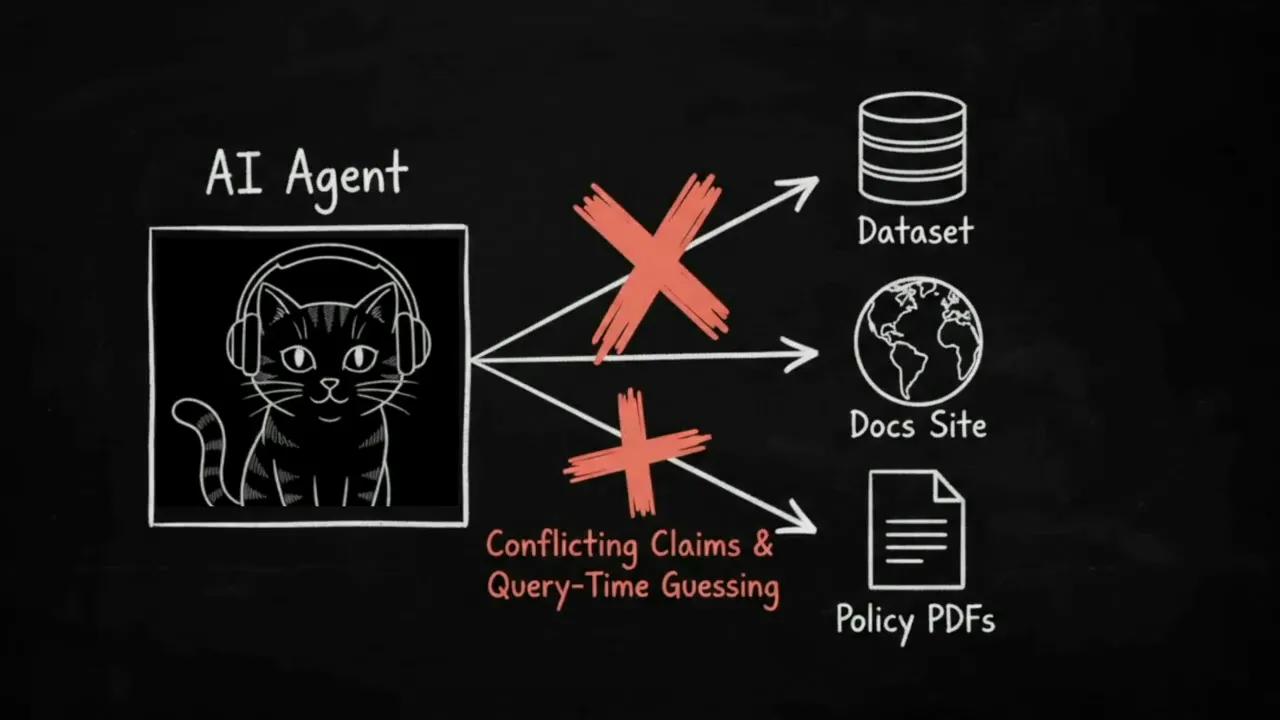
Copying a few approved passages into a prompt avoids that immediate ambiguity, but creates a maintenance job. Your prompt becomes another copy of your content, disconnected from the publishing workflow.
The distinction here is specifically between naive retrieval and compiled knowledge, not a claim that every RAG architecture behaves identically. The useful question is where your system resolves contradictions: during each conversation, or during a reviewable build.
How Sanity Context Compiles a Knowledge Base
A Knowledge Base belongs to your Sanity organization and can combine sources from multiple projects and external systems. The Sanity Context overview explains the broader platform; the central workflow here is straightforward:
- Define the Knowledge Base's purpose.
- Add the sources that support that purpose.
- Build a unified topic outline and Markdown entries.
- Review conflicting claims and establish standing instructions.
- Connect agents through Context MCP.
- Review source changes as the underlying material evolves.
Start with a Purpose, Not a Pile of Documents
Every Knowledge Base starts with a short purpose statement describing whom it serves and what questions it should answer.
That purpose does real work. During compilation, it steers the topic hierarchy. Central entries receive a [core] tag, supporting material can remain untagged, and tangential content receives a [peripheral] tag.
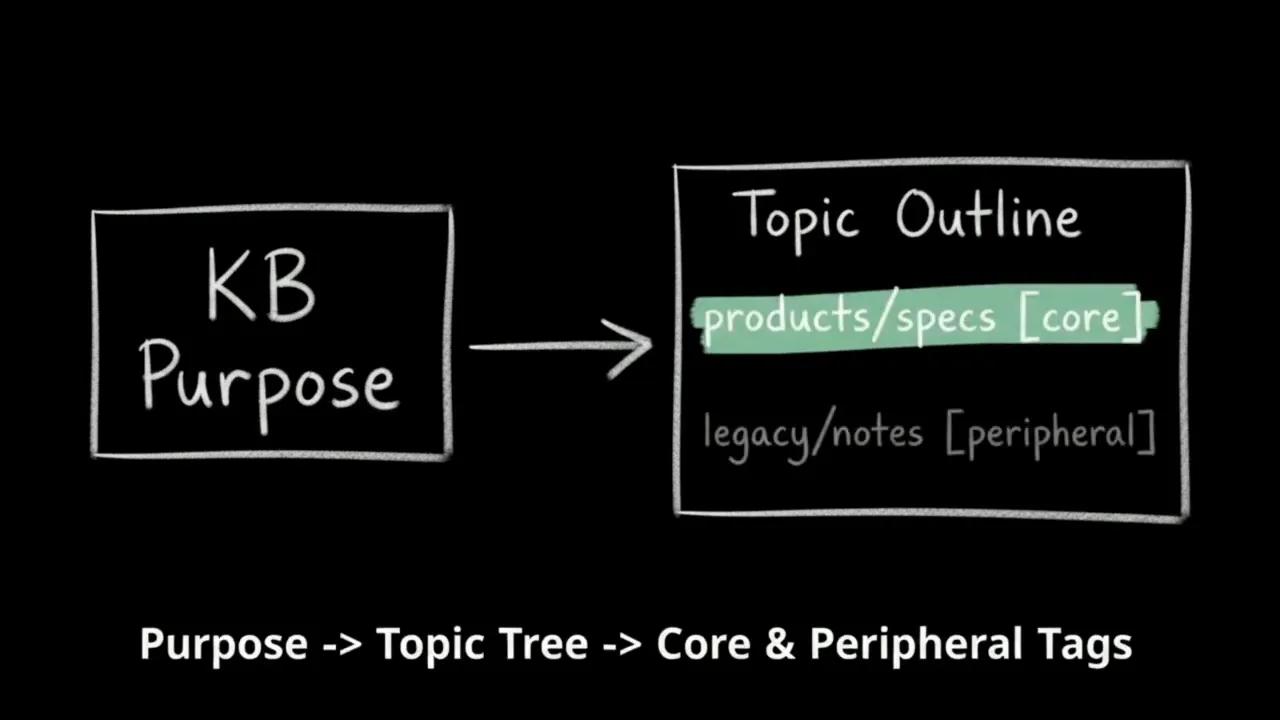
The purpose also appears at the top of the agent's initial_context payload. It helps orient the agent before it chooses which entries to read.
My first production rule is simple: write a sharp one-sentence purpose before expanding the source list. A focused purpose gives the compiler a clearer job than a vague request to organize everything your company knows.
Combine Datasets, Websites, and Files
The Knowledge Base can unify three source categories into one subject-based topic tree:
- Sanity datasets: Published structured content selected with GROQ, including Portable Text.
- Websites: Crawled documentation and web pages, with crawling that respects
robots.txt. - Uploaded files: PDFs, office documents, spreadsheets, Markdown, and other supported formats.
The important part is the output structure. It follows the subject matter, not necessarily your original file names, repository layout, or URL hierarchy.
Supported uploads include PDFs up to 500 MB, DOCX and PPTX files up to 100 MB, XLSX files up to 50 MB, and HTML, AsciiDoc, and images up to 25 MB. Other supported inputs include Markdown, CSV, JSON, YAML, source code, and ZIP, TAR, and TAR.GZ archives. Check the source types reference when planning an ingestion workflow.
Use a Complete GROQ Query with a Narrow Projection
For a dataset source, supply a complete GROQ query, not just a filter. The projection determines which fields the compiler receives.
*[_type == "article" && defined(slug.current)]{
  title,
  summary,
  body
}
This selects articles with a slug, but only passes their title, summary, and body into the build. Internal editorial metadata and unrelated configuration fields stay out.
Dataset sources automatically read published documents only and support up to 5,000 documents per dataset source. Starting narrow keeps the input focused and makes the resulting entries easier to review. The GROQ reference is useful when refining filters and projections.
Resolve Conflicting Claims Before Runtime
Return to that 30-day versus 45-day policy example. During a Knowledge Base build, conflicting claims raise a reviewable issue rather than simply becoming competing passages in the agent's context.
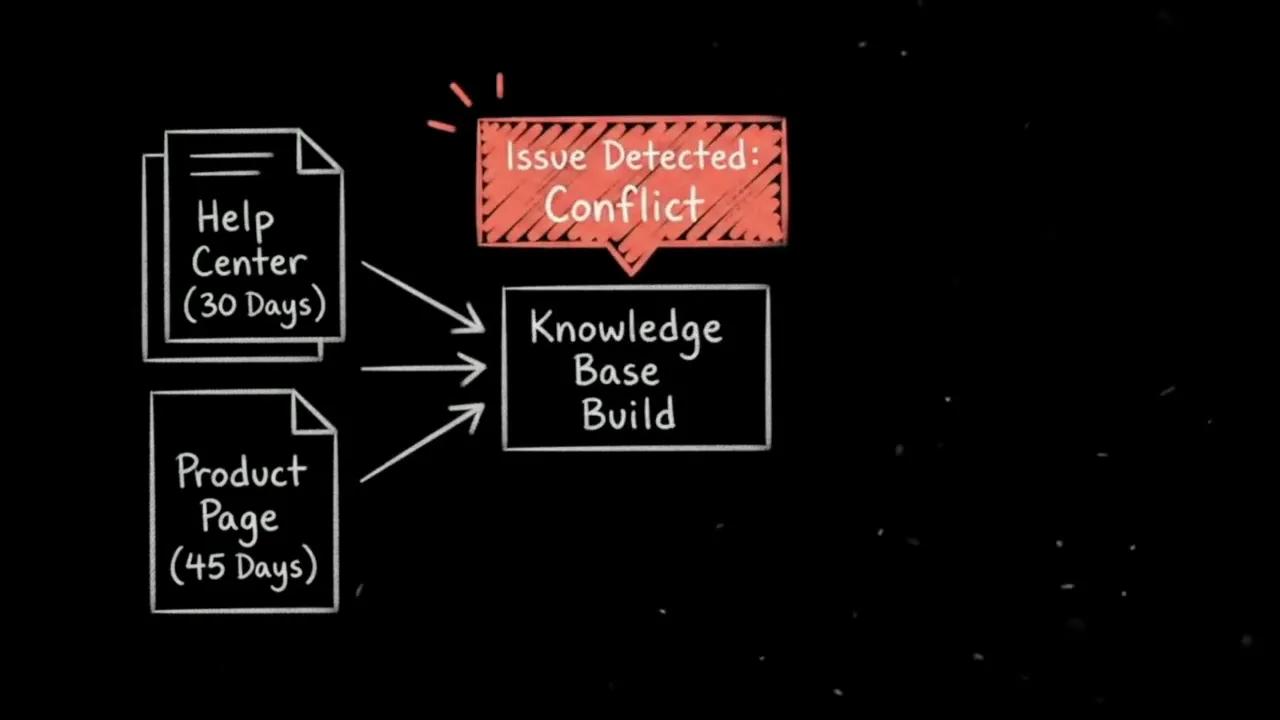
The build surfaces disagreement before an agent has to answer a policy question.
In the Context UI, you inspect the claims and their source attributions, then choose the authoritative interpretation. Resolving the issue creates a standing instruction anchored to the sources.
You can also write custom plain-language instructions, such as trusting the Help Center over marketing pages for return windows. That rule shapes future builds instead of requiring the model to rediscover the same source hierarchy repeatedly.
The underlying document types distinguish the compiled content from its review and governance records:
sanity.context.entry: A compiled Markdown entry.sanity.context.issue: A conflict or structural issue raised for review.sanity.context.instruction: A standing rule, written manually or generated through issue resolution.
The issue resolution guide covers the review workflow in more detail.
Produce a Compact Outline and Cited Markdown
The build produces two complementary artifacts: a compact, slash-delimited topic outline and full Markdown entries with citations back to the original sources.
The outline provides orientation. The entries provide the substance. Your agent does not need every full document in its initial context to understand where relevant information lives.
Calling this “verified company canon” describes a governed workflow, not automatic proof that every source is true. The build exposes disagreements and preserves provenance; your team still decides which claims deserve authority.
How Agents Retrieve Knowledge Through Context MCP
Sanity serves the compiled Knowledge Base through a hosted, read-only Context MCP endpoint. MCP stands for Model Context Protocol, the interface used here to expose context tools to an agent.
The core outline-first workflow uses two tools:
| Tool | Role |
|---|---|
| `initial_context` | Loads the Knowledge Base purpose and compact topic outline. |
| `knowledge_base_read` | Fetches full Markdown entries for selected paths, up to 20 entries per call. |
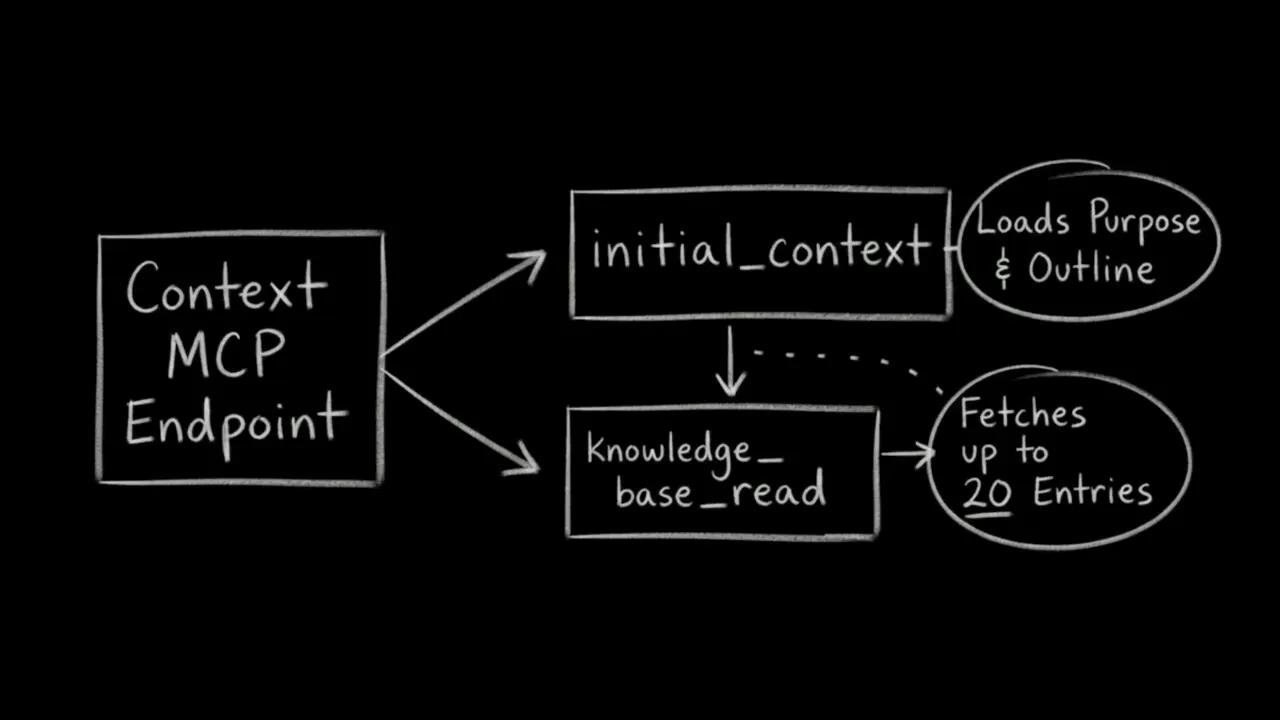
For a returns question, the agent can inspect the outline, identify a path such as support/returns, and read that entry directly. It gets the compiled explanation and its citations rather than relying solely on whichever raw chunk ranks highest.
The tool surface depends on your endpoint's retrieval mode. Use the retrieval modes guide to distinguish Knowledge Base mode from GROQ mode, and the Context MCP tools reference for available tools, including knowledge_base_search where applicable.
The token-efficiency idea is equally straightforward: keep the lightweight outline in context, then fetch only the entries relevant to the question. This is an architectural approach to reducing unnecessary context, not a measured cost or accuracy benchmark.
Read-Only Access and Organization Tokens
Context MCP is strictly read-only. Agents authenticate when connecting, using an organization-level API token with Context Viewer permissions.
That separates reading approved knowledge from editing it. The agent consumes the compiled material; it does not resolve governance issues by rewriting your content through the endpoint.
Use the content access and security guide when provisioning the token, and the Context MCP reference for connection details.
Source Drift, Refreshes, and Rollback
A Knowledge Base is not a live dataset query on every request. It is a compiled representation of selected sources, so keeping it current requires an explicit maintenance loop.
For connected datasets and websites, weekly or monthly scheduled refreshes compare source material against the last build and file issues where material changed.
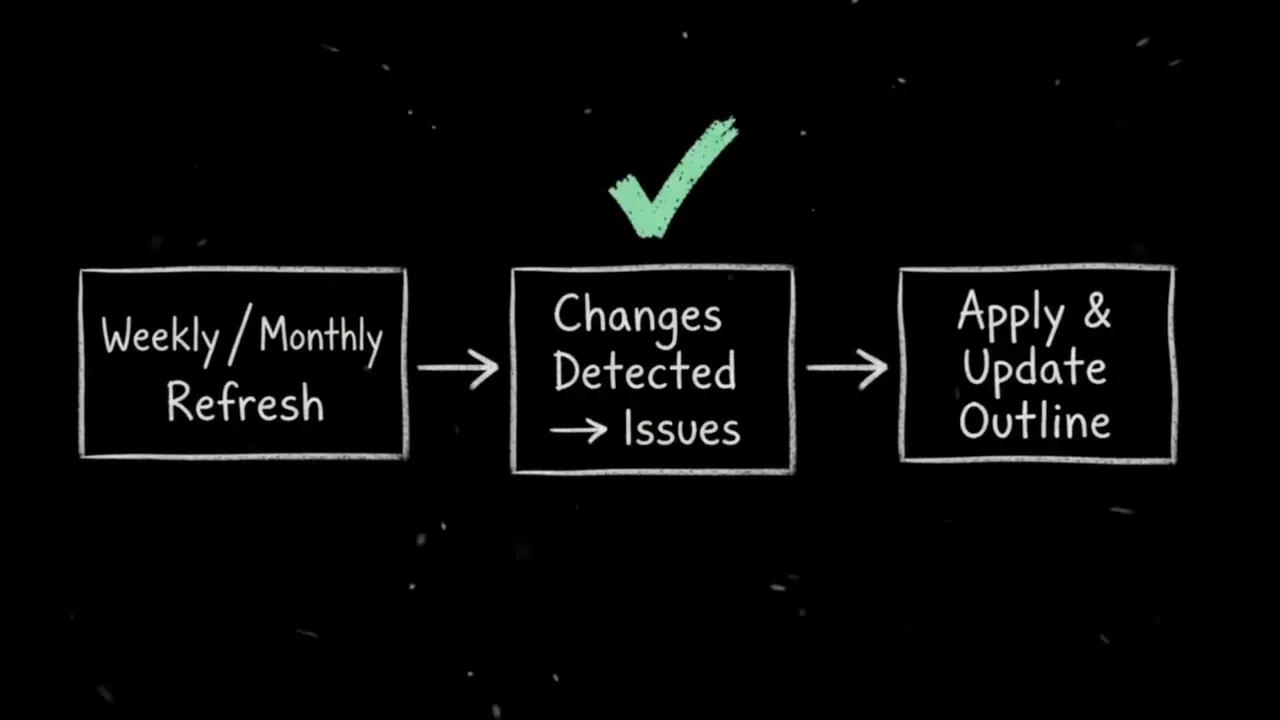
Refreshes surface changes for review rather than silently replacing approved knowledge.
While changes await review, agents continue reading the previously approved entries. New source material does not silently overwrite the knowledge they rely on.
My second production rule is to triage refresh issues and keep version restore in your operational workflow. If an updated build introduces an unwanted outline structure, open Entries, select an earlier outline version, and use Restore this version.
The maintenance guide covers refreshes, rebuilds, and restoration. The production patterns guide provides broader integration guidance, including initial-context handling.
Naive Vector RAG vs. a Compiled Knowledge Base
| Concern | Naive vector RAG | Sanity Context Knowledge Base |
|---|---|---|
| Organization | Raw documents split into chunks | Purpose-driven topic outline |
| Contradictions | Left for the model at query time | Detected during compilation and surfaced for review |
| Retrieval | Similarity-ranked chunks | Outline-guided reads of compiled entries |
| Provenance | Depends on the retrieval implementation | Markdown entries with source citations |
| Source changes | Depend on ingestion and index-update behavior | Reviewable change issues before approved updates |
The biggest shift is not the transport or the file format. It is moving interpretation and conflict resolution into a build process your team can inspect.
Build a Multi-Source Knowledge Base for Agent AJ
On CodingCat.dev, Agent AJ already connects to a Sanity Context MCP endpoint named agent-aj-mcp. The existing endpoint uses our production dataset in Dataset, or GROQ, mode.
For this implementation, I wanted something a little more fun: developer lore and dad jokes from external repositories and a local Markdown file, without adding that material to our primary CMS content model.
Step 1: Inspect the Existing GROQ-Mode Endpoint
The existing endpoint scopes dataset access with this groqFilter:
_type in ["podcast", "post", "author", "page", "sponsor", "course"]Notice the distinction from a Knowledge Base dataset source. This is an endpoint filter, while the earlier source example was a complete query with a projection.
Agent AJ can already use the MCP connection and semantic search capabilities to answer site-content questions. Asking for the latest podcast returns a rich card for “GenAI for Engineers, What's Real, What's Not and What's Coming.”
That is a useful baseline: the application and MCP connection already work. We are changing the endpoint's content source, not rebuilding the chat interface.
Step 2: Create the Knowledge Base and Define Its Purpose
In Sanity Context, select + New knowledge base and enter:
- Title: AJ Knowledge Jokes
- Purpose: Fun Jokes for codingcat.dev
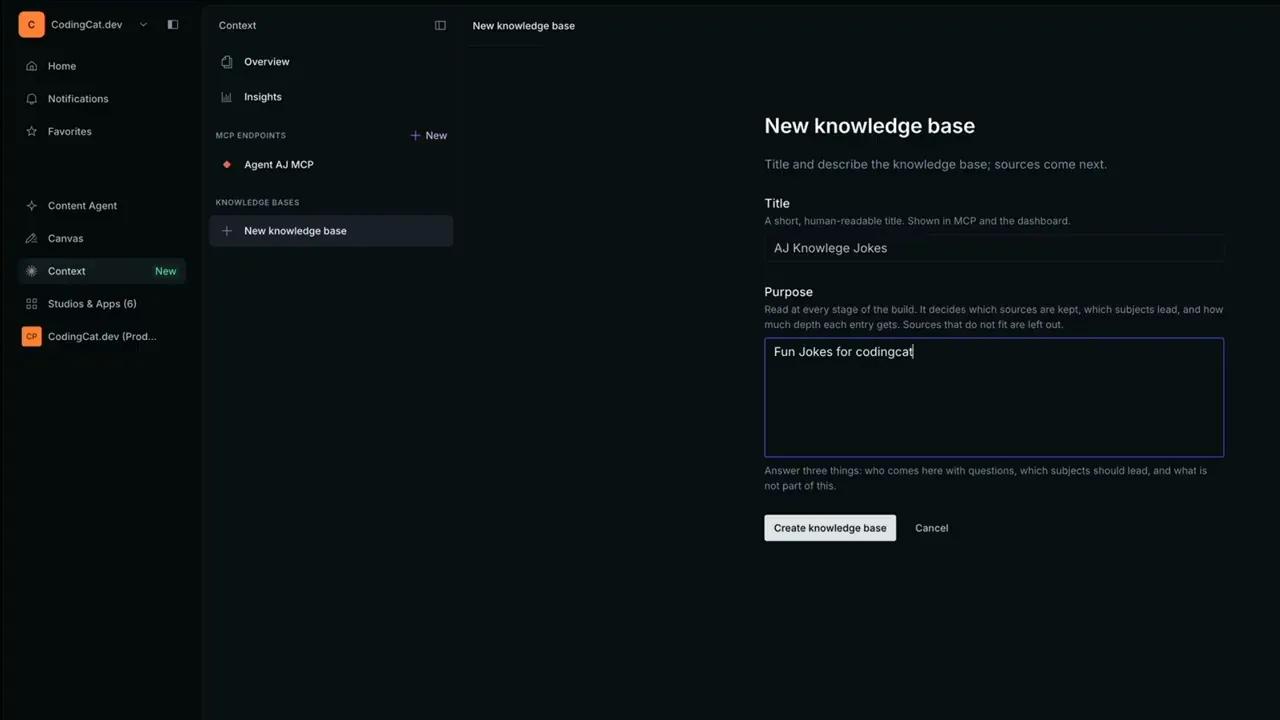
Select Create knowledge base to open the Add source workflow. If the feature needs enabling for your organization, use Sanity Manage Labs. The creation guide provides the setup reference.
Step 3: Add Two Websites and One Markdown File
Rather than attaching our dataset, we combine three sources:
- Jeff Dean Facts: Add the Jeff Dean Facts repository as a Website source. It collects programmer humor built around exaggerated engineering accomplishments.
- Developer lore: Upload
Legendary-Web-Developer-Lore-&-History.mdthrough the Files source option. I generated this file with Gemini; it includes stories such as the 500-Mile Email Incident, the left-pad npm crisis, and the Morris Worm. - Dad jokes: Add Wes Bos's programming dad jokes as another Website source.
Using the Website option for these GitHub URLs means we are supplying web pages to crawl, not configuring a dedicated repository integration.
The Sources list now contains two websites and one file. Different origins, different formats, one Knowledge Base.
Also, keep the input quality in perspective: compiling a generated lore document does not independently authenticate every historical anecdote. Citations and conflict review make the material inspectable, but source selection still matters.
Step 4: Build the Entries and Respect the Readiness Guardrail
Select Build entries. Sanity Context processes the source material, plans an outline around the purpose, and compiles the entries.
I tried switching Agent AJ's endpoint from Dataset to Knowledge bases before that initial build finished. The endpoint correctly reported that the attached Knowledge Base had no entries and needed building before an agent could connect.
Creating a Knowledge Base is not the same as making it ready to serve. Wait for the first build to produce entries before expecting the endpoint to use it.
Step 5: Review and Resolve a Conflicting Claim
The build surfaced one issue under Issues, scoped to the whole Knowledge Base.
Two compiled entries disagreed about a vacation-related Jeff Dean fact. One treated the repository as confirming the anecdote as true. Another said that Kenton Varda, associated with the original list, had not confirmed that specific fact.
The important feature was not the seriousness of the subject. It was the workflow: a contradiction between compiled entries became an explicit issue with competing interpretations to review.
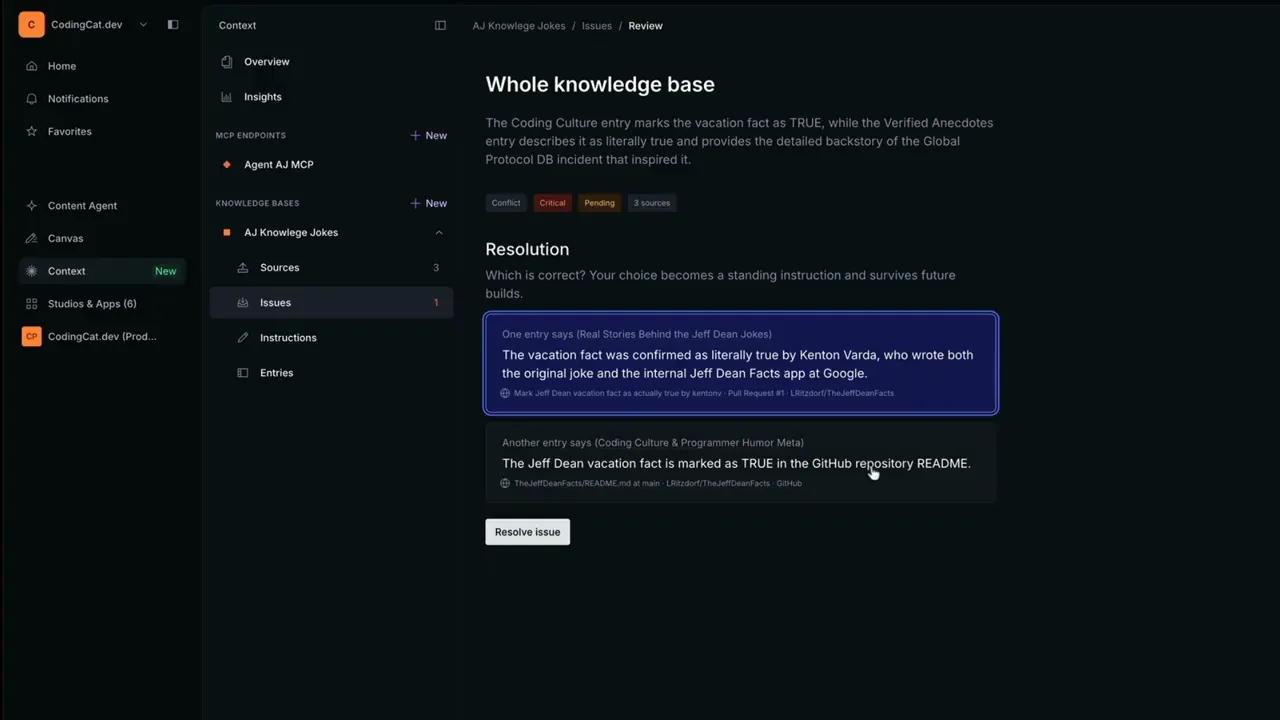
Choose the supported interpretation explicitly so future builds can apply the resulting instruction.
For this demo, I selected the first interpretation and used Resolve issue. That established the Knowledge Base's chosen interpretation and generated the corresponding standing instruction.
You do not have to resolve every issue immediately to inspect the compiled entries. For production policies or other consequential content, however, the review deserves more care than a quick choice between joke-related claims.
Step 6: Inspect the Topic Outline and Markdown Entries
In Entries, the three sources have been organized into five topics:
- Coding Culture & Programmer Humor Meta
- GitHub Repo Commits & Contributions
- Real Stories Behind the Jeff Dean Jokes
- Legendary Software Engineering Anecdotes
- Programming & Tech Dad Jokes
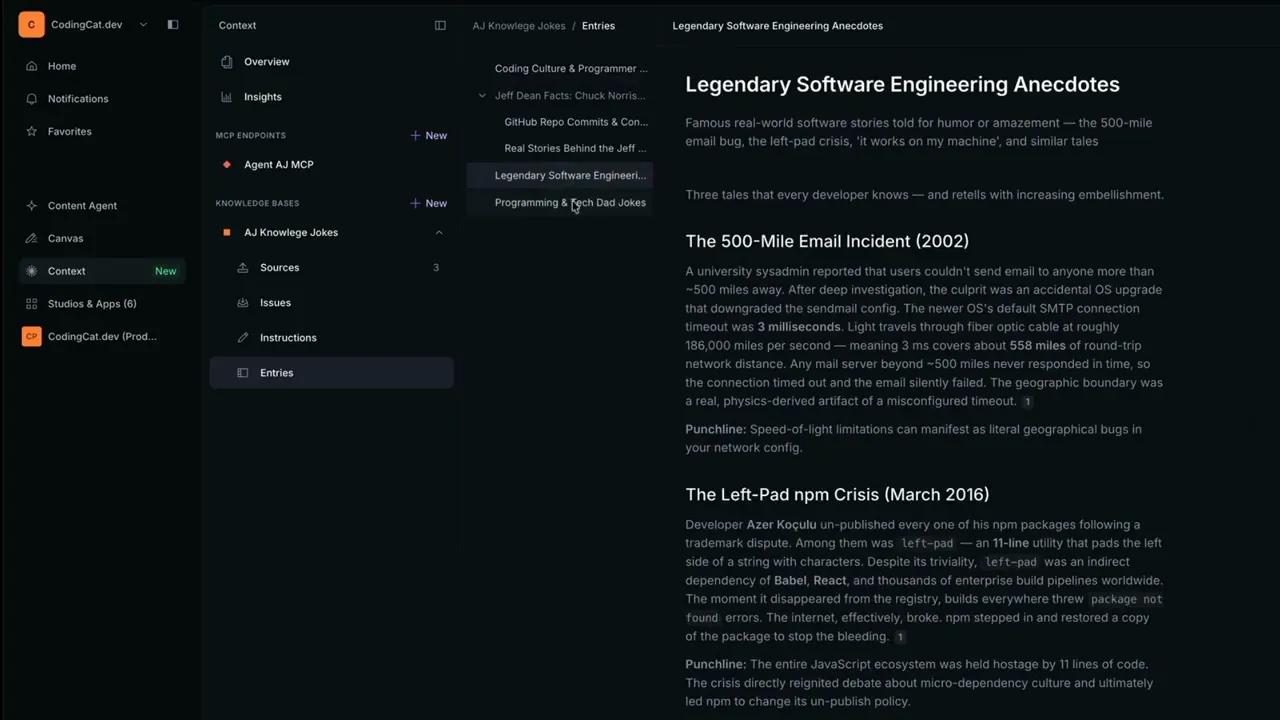
The dad-jokes entry is organized into technical categories such as Git and version control, databases and SQL, object-oriented and functional programming, and general jokes.
That is a useful result. We did not simply get three raw source dumps. We got a navigable subject structure with synthesized Markdown and citations back to the original material.
Step 7: Attach the Ready Knowledge Base and Test Agent AJ
Return to Agent AJ MCP, select Knowledge bases as the content source, and attach AJ Knowledge Jokes. Once it displays Ready, select Save changes.
The existing website can now use the updated endpoint without a frontend redeployment.
For the first test, I asked Agent AJ for a developer or dad joke. It returned the dark-mode joke from the Programming & Tech Dad Jokes collection: programmers prefer dark mode because light attracts bugs.
I then opened the compiled entry and located the matching joke. For a second test, I supplied the setup about there being 10 types of people in the world. Agent AJ completed it with the binary punchline: those who understand binary and those who do not.
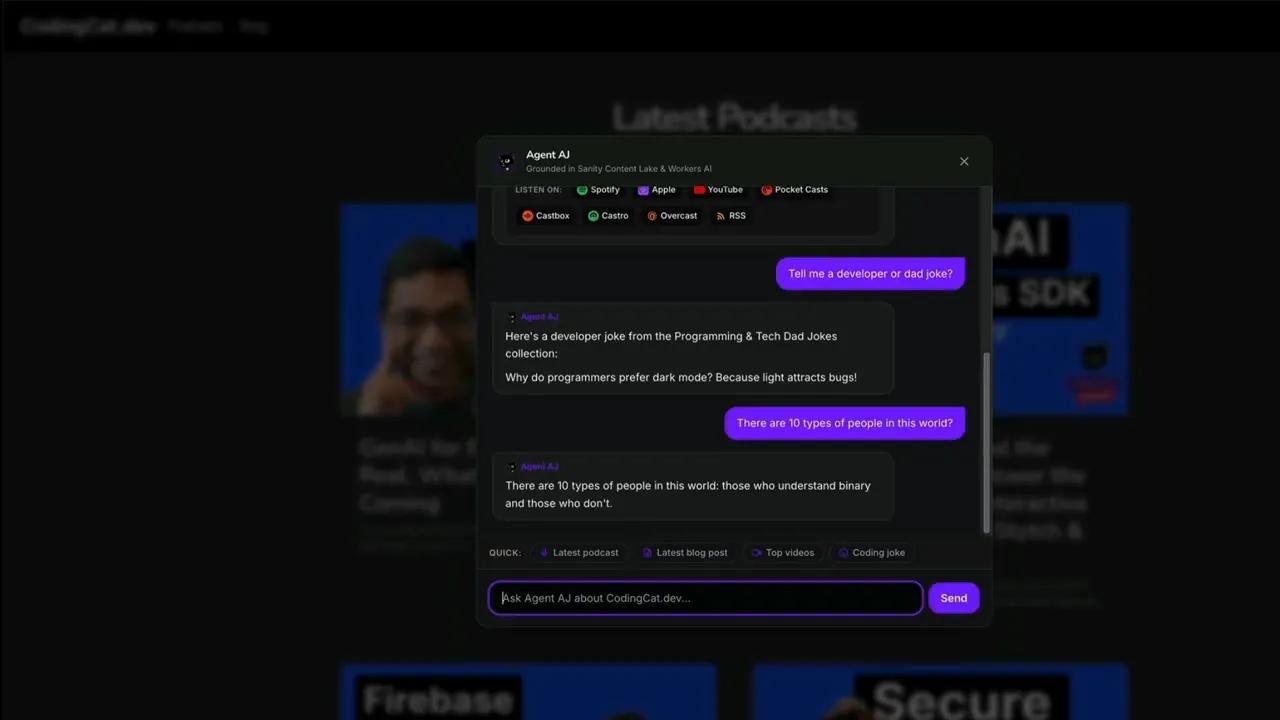
Test the live answer, then compare it with the compiled entry rather than stopping at a plausible response.
These tests demonstrate that the endpoint change works and that the responses match the compiled collection. They are not a substitute for inspecting tool activity in a production integration, especially when an answer could also come from the model's general knowledge.
Step 8: Connect a Coding Agent or Your Own Application
Open the endpoint and select Connect agent. There are two convenient paths:
- Set up with AI: Copy the generated setup prompt into a coding agent such as Cursor, Claude Code, or Codex. It provides connection instructions the agent can apply to your stack and verify.
- Sample code: Copy the supplied integration code and wire the MCP client into your application.
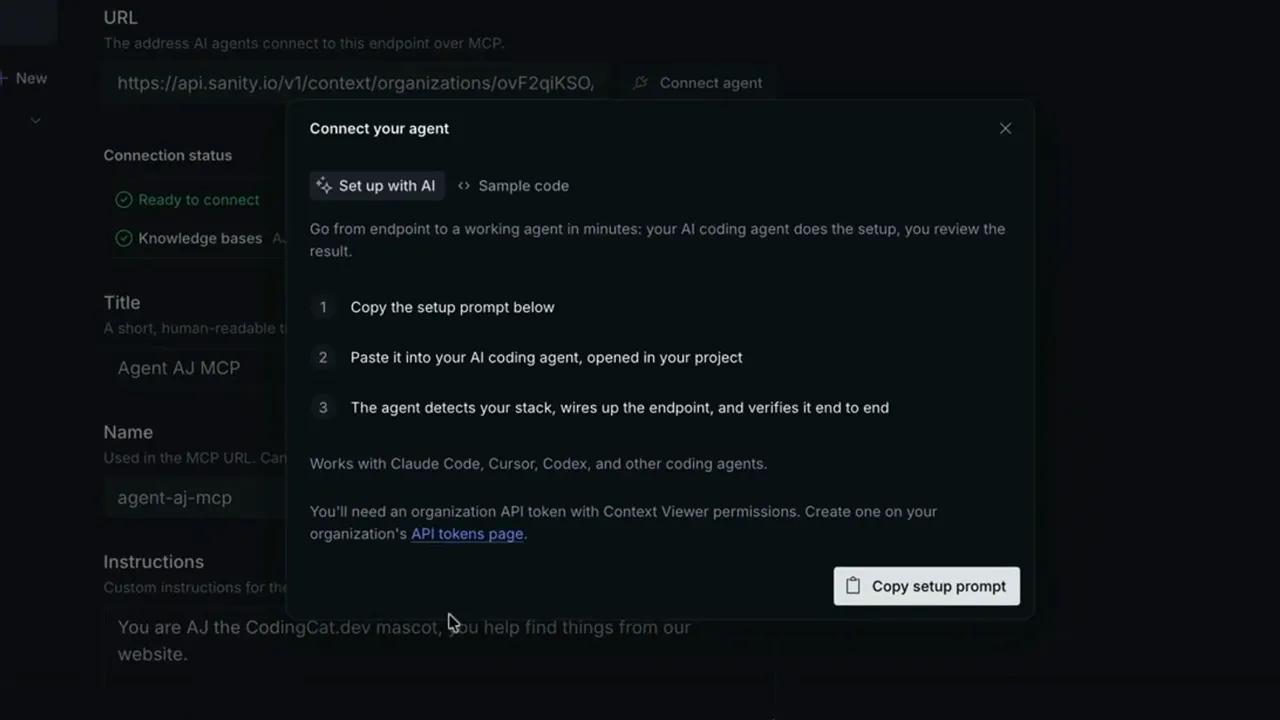
I recommend starting with the generated prompt if you already use a coding agent. For a custom application, keep the MCP connection and organization token on the server side.
This TypeScript connection skeleton shows the MCP portion. Replace the organization ID and use your configured endpoint name:
import { Client } from '@modelcontextprotocol/sdk/client/index.js'
import { StreamableHTTPClientTransport } from '@modelcontextprotocol/sdk/client/streamableHttp.js'

const mcpClient = new Client({
  name: 'codingcat-agent-aj',
  version: '1.0.0',
})

await mcpClient.connect(
  new StreamableHTTPClientTransport(
    new URL(
      'https://api.sanity.io/v1/context/organizations/YOUR_ORG_ID/mcp/agent-aj-mcp'
    ),
    {
      requestInit: {
        headers: {
          Authorization: `Bearer ${process.env.SANITY_CONTEXT_TOKEN}`,
        },
      },
    }
  )
)

const { tools } = await mcpClient.listTools()

// Next: expose the discovered tools to your model integration,
// execute requested tool calls, and return results to the model.
This establishes the connection and discovers tools; it is not a complete question-answering loop. The endpoint's Sample code is the better starting point for the full integration, including the model client and tool execution.
Framework-specific guides are available for the Vercel AI SDK, OpenAI Agents SDK, and LangChain.
Bonus: Inspect the Organization Context Store with @sanity/client
Agents consume the Knowledge Base through MCP, but backend services can also inspect its underlying documents. Entries, issues, and instructions live in the organization Context store, not an individual project's dataset.
Starting with @sanity/client version 8.4.0, client.context supports querying and listening to that store. This is useful when a backend or CI/CD process needs visibility into pending Knowledge Base issues.
import { createClient } from '@sanity/client'

// Requires @sanity/client >= 8.4.0 and an organization API token
// with Context Viewer permissions.
const client = createClient({
  apiVersion: '2026-08-25',
  useProjectHostname: false,
  useCdn: false,
  token: process.env.SANITY_CONTEXT_TOKEN,
  context: {
    organizationId: 'YOUR_ORGANIZATION_ID',
  },
})

const openIssues = await client.context.fetch(
  `*[
    _type == "sanity.context.issue" &&
    knowledgeBaseId == $knowledgeBaseId &&
    status == "open"
  ]{
    _id,
    status,
    content
  }[0...50]`,
  {
    knowledgeBaseId: 'kb_YOUR_KNOWLEDGE_BASE_ID',
  }
)

console.log('Open Knowledge Base Issues:', openIssues)
The query returns up to 50 open issues for the specified Knowledge Base. It provides programmatic visibility into review work without changing the agent-facing retrieval flow.
Build Knowledge Your Agent Can Navigate
The Agent AJ example uses jokes, but the architecture applies to a much more practical problem: giving an agent a coherent account of what your organization has approved.
Start with a clear purpose. Select high-signal sources. Review contradictory claims. Preserve citations. Then let the agent orient itself with a compact outline and read only the entries it needs.
That is the real advantage over naive chunk retrieval: your team handles knowledge governance before the conversation, rather than asking the model to improvise it during the answer.
Build Your First Sanity Context Knowledge Base
Follow the official guide to compile multi-source knowledge and connect it to your agent through Context MCP.
Video Summary
Naive Vector RAG vs. Sanity Context Knowledge Bases (Full MCP Tutorial): Stop forcing your AI agents to guess across conflicting chunks at query time. Learn how Sanity Context Knowledge Bases compile your structured datasets, documentation websites, and files ahead of time to serve verified company canon over Context MCP: https://www.sanity.io/docs/ai/sanity-context-know