Running 11 Persistent AI Agents with Kiro Crew: What Broke, How I Fixed It, and How to Ship It on AWS
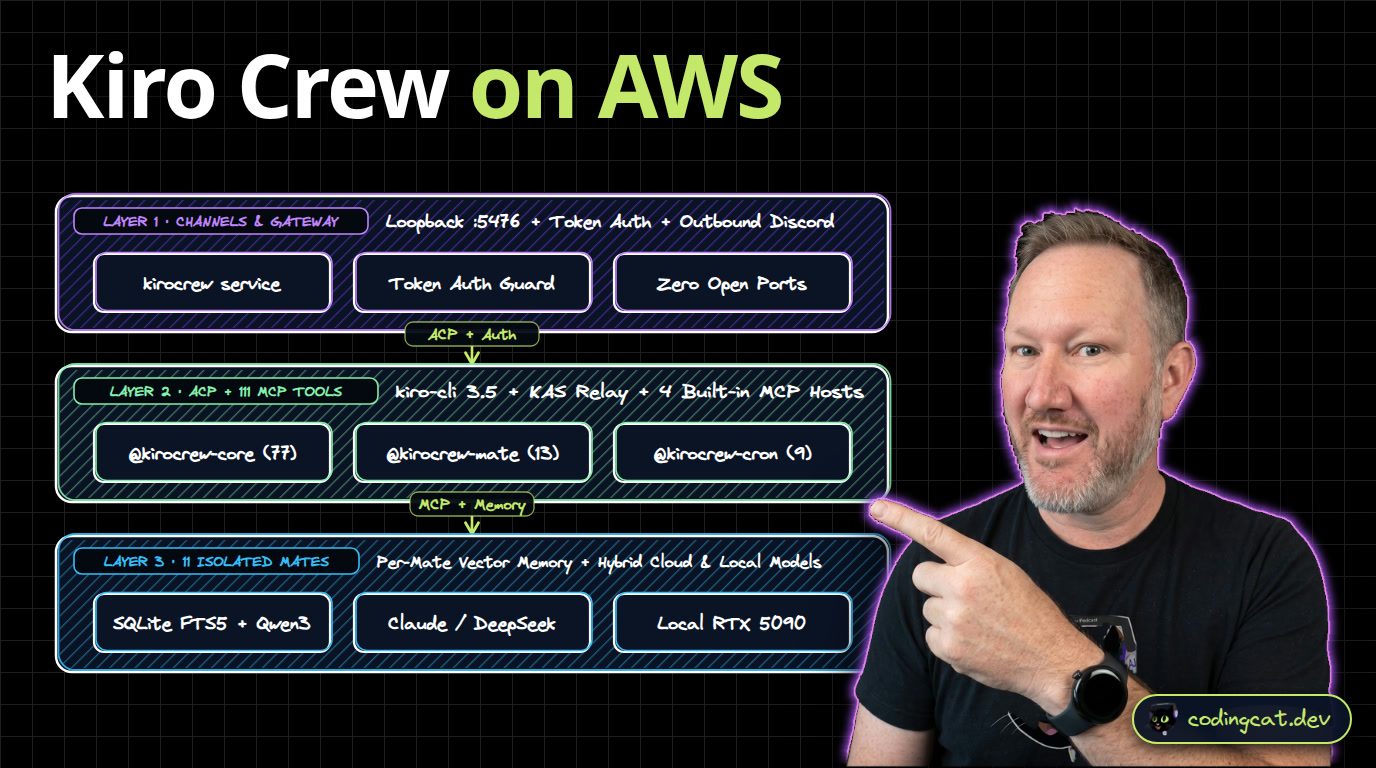

Every AI demo looks effortless when you have one chat tab open on your laptop. The moment you try to run 11 persistent, autonomous agents across real repositories, scheduled crons, Discord DMs, and AWS services, reality hits fast.
For the AWS Builder Center CB Speed Run 2 challenge, the theme is "slow is smooth, and smooth is fast." Instead of throwing together a toy hello-world Lambda, I dug into my production Kiro Crew (v0.12.0) + kiro-cli 3.5.0 multi-agent fleet, audited every warning with kirocrew doctor, documented the five sharpest things that actually broke, and mapped the exact fixes to ship the whole stack cleanly on AWS.
Let's break down the architecture, walk through the real failure modes and fixes, and compare local systemd vs. AWS EC2 deployment.
1. The Mental Model: How Kiro Crew Runs 11 Persistent Agents
Most developers treat AI coding assistants as stateless CLI invocations: you type a prompt, watch it edit a file, and close the terminal. When you close your laptop lid, the context evaporates.
Kiro Crew flips that model into a long-lived personal agent daemon (kirocrew service install) with three distinct architectural layers:
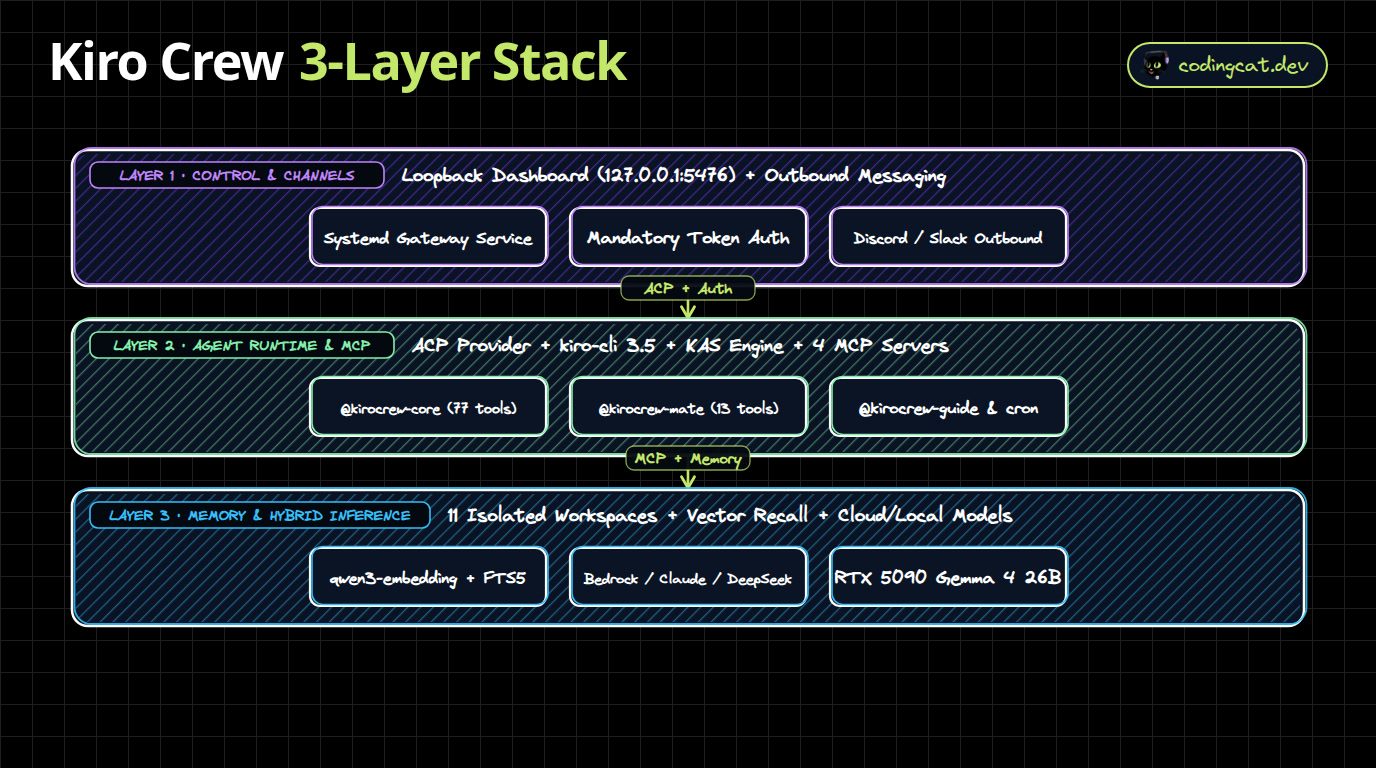
- Control Plane & Outbound Channels (Layer 1): A single loopback gateway listening strictly on
127.0.0.1:5476with mandatory token authentication (even localhost is never exempt). Messaging integrations like Discord and Slack connect outbound, meaning you never open inbound firewall ports to your home lab or VPC. - Agent Runtime & Built-In MCP Hosts (Layer 2): Kiro Crew runs over the Agent Client Protocol (
acp) backed bykiro-cli 3.5.0(and its KAS relay), exposing four built-in MCP servers totaling 111 tools:@kirocrew-core(77 tools for files, execution, search, and artifacts)@kirocrew-mate(13 tools for cross-mate delegation and orchestration)@kirocrew-guide(12 tools for self-diagnostics and documentation)@kirocrew-cron(9 tools for scheduled jobs and weekly reports)
- Isolated Mates, Vector Memory & Hybrid Inference (Layer 3): Instead of stuffing every project into one giant prompt, I split my workflow into 11 specialized Crew Mates (
site-lead,content-lead,podcast-lead,social-lead,devrel-lead,tools-lead,flipcore-lead,alexpatterson-lead,mayville-lead,retirement-lead, andassistant). Each mate gets its own isolatedWORKSPACE, its ownMEMORY_STORE(SQLite FTS5 + in-processqwen3-embedding-0.6b.gguf), and its own model route.
Here is the real output from kirocrew agent list on my workstation showing hybrid routing across cloud models and a local GPU:
NAME                 WORKSPACE                 MODEL                         DISPLAY_NAME
assistant            member-assistant          claude-haiku-4.5              Assistant
site-lead            member-site-lead          deepseek-3.2                  CodingCat Site Lead
content-lead         member-content-lead       local-rtx5090/gemma-4-26B-A4B CodingCat Content Lead
social-lead          member-social-lead        local-rtx5090/gemma-4-26B-A4B CodingCat Social Lead
podcast-lead         member-podcast-lead       local-rtx5090/gemma-4-26B-A4B CodingCat Podcast Lead
devrel-lead          member-devrel-lead        local-rtx5090/gemma-4-26B-A4B DevRel MCP Lead
That architecture is clean on paper. Now let's look at the five things that actually broke in practice and how I fixed them.
2. Five Real Gotchas That Broke (and How I Fixed Them)
Running kirocrew doctor is the single highest-leverage habit you can build with Kiro Crew. Every one of these failures surfaced either during a live agent run or inside a doctor audit.
Gotcha 1: The Non-Interactive Systemd node v10.24.1 Trap
What broke: My interactive bash shell runs Node v22.23.2 via nvm, so every manual CLI test passed. The moment Kiro Crew ran as a background systemd service, kirocrew doctor failed hard:
Dependencies
  git:         ✅ /usr/bin/git
  node:        ❌ v10.24.1 < v22.12.0
               Fix: Node.js v10.24.1 is too old: Kiro Crew needs v22.12.0 or newer.
Why it happened: systemd units and non-interactive subshells never source ~/.bashrc or ~/.nvm/nvm.sh. They fall back to /usr/bin/node, which on Ubuntu was an ancient apt-installed v10.24.1. Any Node-based MCP server or JS tool launched by the background daemon silently inherits that broken runtime.
The fix: Pin the exact Node 22/24 binary path in /etc/kirocrew/kirocrew.env (which the managed systemd service loads at boot) and restart the daemon cleanly:
# /etc/kirocrew/kirocrew.env
PATH=/home/alex/.nvm/versions/node/v22.23.2/bin:/home/alex/.local/bin:/usr/local/bin:/usr/bin:/bin
KIROCREW_PORT=5476# Apply the service environment and re-verify
kirocrew restart
kirocrew doctorAJ Pro-Tip: Never assume your interactive terminalPATHmatches your background agent daemon. If you install Node vianvmormise, always verifywhich nodeinside a non-login shell (bash -c 'node -v') before trusting a background agent service.
Gotcha 2: MCP Projection Withholding & Enterprise Registry Mode
What broke: When testing multiple agent harnesses alongside kiro-cli, kirocrew doctor logged a sharp set of warnings:
WARNING kiro_crew.providers.mirrors.opencode: deepseek session MCP:
  withholding server 'kirocrew-guide' -- it is one of Crew's own servers,
  and an element the agent spec describes cannot carry this session's identity

WARNING kiro_crew.providers.mirrors.opencode: strands session MCP:
  withholding server 'kirocrew-mate' -- it is one of Crew's own servers,
  and an element the agent spec describes cannot carry this session's identity
Why it happened: Kiro Crew's native transports (kiro and kas) carry cryptographic session identity (sel_hmac.key) and per-tool deny channels. External harness mirrors (such as Codex, Copilot, DeepSeek, Goose, OpenCode, and Strands) cannot pass Crew's session identity to Crew-owned MCP servers. Rather than mounting a broken or unauthenticated server, Kiro Crew intentionally withholds @kirocrew-guide and @kirocrew-mate on those backends.
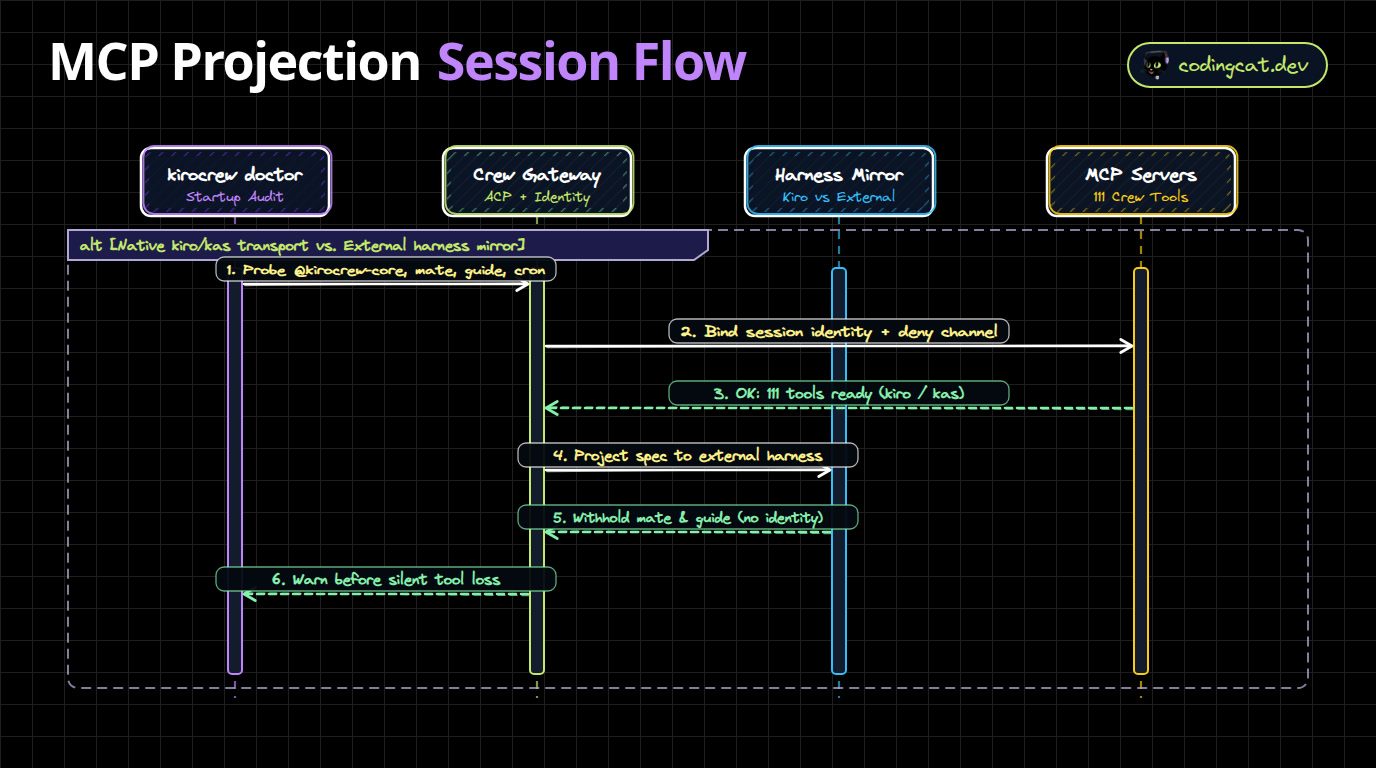
A second related trap hits AWS Identity Center users: if your organization enables an Enterprise MCP Registry URL, kirocrew doctor probes will pass locally (@kirocrew-core: 77 tools), yet live sessions will see zero tools because kiro-cli only connects to servers explicitly marked "type": "registry".
The fix:
- Keep orchestration and mate-delegation tasks on native
kiro/kastransports where all 111 tools resolve cleanly (mcp tool refs: ✅ kiro,✅ kas). - If you run under AWS Identity Center with an admin MCP Registry, flip registry mode on and allow-list the four exact server names:
# Enable Enterprise MCP Registry mode for Identity Center environments
kirocrew config set agent.mcp_registry_mode true

# Have your administrator allow-list these exact MCP server names:
# kirocrew-core, kirocrew-cron, kirocrew-guide, kirocrew-mate
Gotcha 3: Sandboxed Harnesses Cannot Read ~/.aws/credentials
What broke: When wiring an agent harness like AWS Strands to call Amazon Bedrock, my first instinct was to rely on my local ~/.aws/config SSO profile (AdministratorAccess). Every call failed with missing credentials even though aws sts get-caller-identity worked in my shell.
Why it happened: Kiro Crew executes external harnesses inside a strict sandbox without mounting ~/.aws or inheriting your host shell's AWS environment variables. That is a great security default, because a prompt-injected agent cannot exfiltrate your root or SSO session tokens, but it will catch you off guard if you expect standard AWS SDK credential chain fallback.
The fix: Store scoped Bedrock credentials inside Kiro Crew's encrypted secret vault (~/.kiro/crew/.vault) and explicitly map them to the harness environment:
# Import credentials into Kiro Crew's encrypted secret vault (never plain .env in workspaces)
kirocrew secrets set AWS_BEARER_TOKEN_BEDROCK
kirocrew secrets set AWS_REGION --value us-east-1

# Map only the required secret keys to the sandboxed Strands harness
kirocrew config set agent.strands_env.AWS_BEARER_TOKEN_BEDROCK "secret:AWS_BEARER_TOKEN_BEDROCK"
kirocrew config set agent.strands_env.AWS_REGION "secret:AWS_REGION"
Gotcha 4: Optional Venv Extras (stt_extra_missing and faiss-cpu Fallback)
What broke: Even though Kiro Crew downloaded the local Whisper model (~/.kiro/crew/models/whisper/ggml-base.bin) and the embedding model (qwen3-embedding-0.6b.gguf), kirocrew doctor flagged two silent performance and capability gaps:
Vector Memory (in-process embeddings)
  faiss:       ⏹ not installed (optional) -- episodic recall uses the stdlib fallback
  model:       ✅ /home/alex/.kiro/crew/models/qwen3-embedding-0.6b.gguf

Speech-to-Text
  engine:      ❌ speech recognition needs its voice dependencies (stt_extra_missing)
  model:       ✅ base at /home/alex/.kiro/crew/models/whisper/ggml-base.bin
Why it happened: Kiro Crew ships inside a pinned virtual environment (~/.kiro/crew-venv-0.12.0) to keep the core wheel install fast and deterministic. Heavy native bindings like faiss-cpu, pywhispercpp, and amazon-transcribe are optional extras. If you install them into your global system Python instead of the Crew venv, Kiro Crew never sees them.
The fix: Install the optional extras directly into Kiro Crew's managed virtual environment and restart the service:
# Install FAISS for fast vector recall + voice extras (Amazon Transcribe + Whisper) into Crew's venv
~/.kiro/crew-venv-current/bin/python3 -m pip install \
  faiss-cpu \
  'boto3>=1.34,<2' \
  'amazon-transcribe>=0.6.3,<1' \
  'pywhispercpp>=1.5,<2'

kirocrew restart
kirocrew doctor
At the same time, keep your mates' context sharp by pairing per-mate MEMORY_STORE isolation with repo-local steering docs (for example, .kiro/steering/architecture.md) so site-lead never bleeds CodingCat.dev Astro 7 conventions into unrelated repositories.
Gotcha 5: Moving to AWS EC2 Without Exposing Port 22 or a Public Dashboard
What broke (mentally before it broke in prod): Running 11 agents on a home workstation works great until you travel or want 24/7 cloud uptime. The knee-jerk mistake is spinning up an EC2 instance, opening TCP 5476 or SSH port 22 to 0.0.0.0/0, and pasting an admin IAM role onto the instance profile.
The fix: Kiro Crew ships with a built-in AWS deployment workflow (kirocrew cloud) designed around zero-inbound-port security:
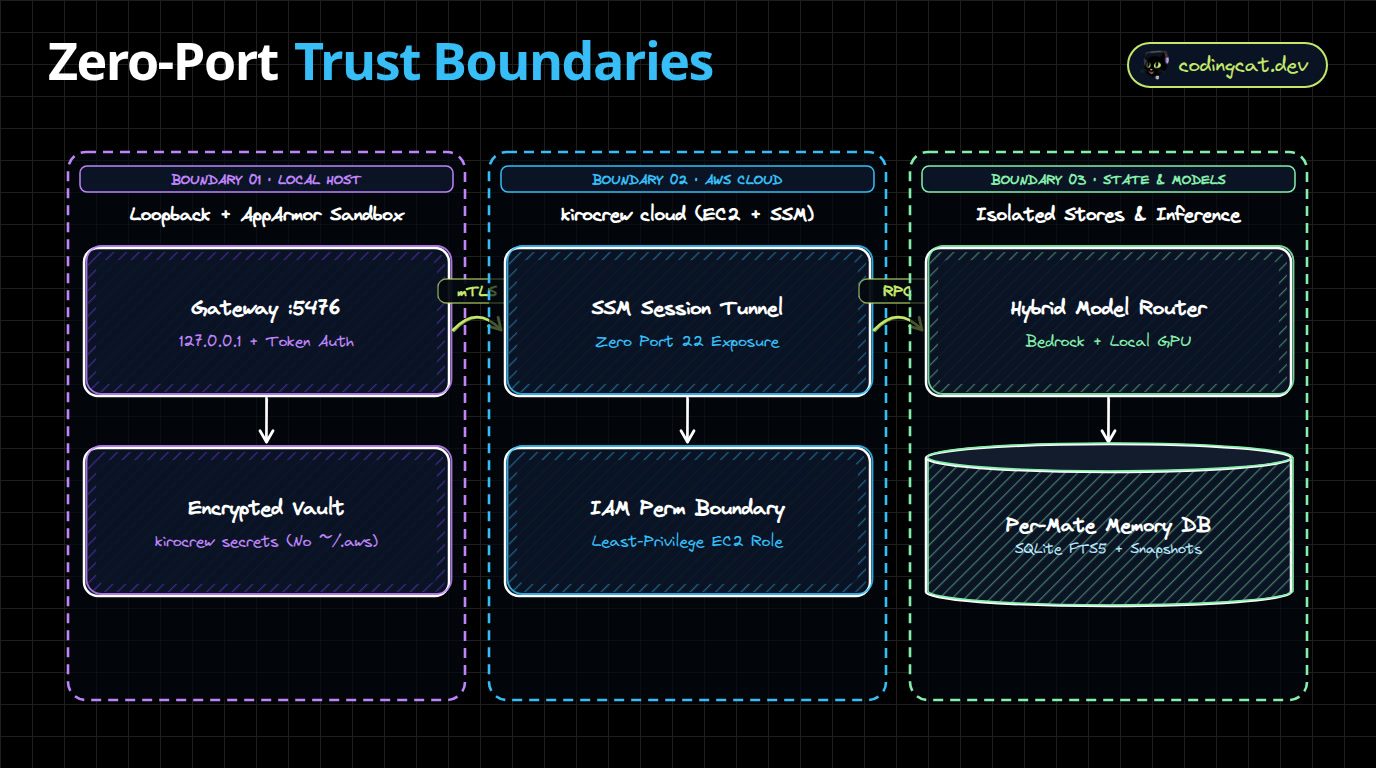
- Pre-create Immutable IAM Permissions Boundaries: Run
kirocrew cloud iam-boundaryonce as an AWS admin so the EC2 instance role can never escalate privileges. - Launch with Least-Privilege Defaults: Provision an Amazon Linux 2023 instance and install extra tools (
gh,jq) declaratively. - Connect Exclusively Over AWS Systems Manager (SSM): Reopen the Kiro Crew dashboard over an encrypted SSM tunnel with zero public SSH ports.
- Migrate State Portably: Export your local mates, crons, and memory with
kirocrew snapshotand hydrate the EC2 instance withkirocrew restore.
# 1. Verify AWS credentials and cloud prerequisites
kirocrew cloud doctor

# 2. One-time admin step: create least-privilege EC2 + Fargate permissions boundaries
kirocrew cloud iam-boundary

# 3. Launch a dedicated Kiro Crew EC2 instance on Amazon Linux 2023
kirocrew cloud launch --size power --extra-packages gh,jq

# 4. Open the loopback dashboard over an encrypted AWS SSM tunnel (zero port 22)
kirocrew cloud connect

# 5. Pause EC2 billing when you do not need cloud compute
kirocrew cloud stop
3. The Trade-Off Matrix: Local Systemd vs. kirocrew cloud vs. Ad-Hoc CLI
Choosing where to run persistent agents comes down to latency, GPU access, network posture, and cost predictability. Here is how the three operating models stack up in production:
| Dimension | Local Systemd + Hybrid GPU (My Daily Driver) | kirocrew cloud (AWS EC2 + SSM) | Ad-Hoc Single-Session CLI |
|---|---|---|---|
| Uptime & Cron Reliability | High while workstation stays powered on | 24/7 cloud uptime (pausable with cloud stop) | Zero (stops when terminal closes) |
| Network Exposure | Loopback 127.0.0.1:5476 + outbound Discord/Slack | Zero inbound ports (AWS SSM Session tunnel) | Local process only |
| Secret & IAM Isolation | AppArmor sandbox + encrypted .vault (no ~/.aws leak) | Immutable IAM permissions boundary + encrypted .vault | Inherits full host shell & ~/.aws |
| Memory & Context | 11 isolated SQLite FTS5 + qwen3-embedding stores | Portable via kirocrew snapshot / restore | Ephemeral per-session context |
| Inference Cost Curve | Near \$0 for local RTX 5090 (gemma-4-26B-A4B) + API bursts | Predictable EC2 compute + Bedrock/API usage | Pay-per-token cloud API only |
| Operational Sharp Edge | Non-interactive systemd PATH (node v10 vs v22) | Requires initial iam-boundary + cloud login step | Manual copy-paste between tasks |
4. Verdict: Purrfect or Pass? (Plus Two AWS Wishes)
Verdict: Purrfect for builders who want real multi-agent isolation without duct-taping five open-source frameworks together.
The "slow is smooth, and smooth is fast" lesson from running Kiro Crew across 11 specialized mates is simple: treat your AI agent fleet like a production Linux and AWS service, not a browser tab. Run kirocrew doctor after every upgrade, pin your systemd Node PATH, keep credentials inside kirocrew secrets, and let kirocrew cloud handle IAM boundaries and SSM tunneling when you move to EC2.
Two AWS Wishes Filed While Building
In the spirit of #cb-speed-run-2, here are two concrete improvements that would make Kiro Crew even smoother out of the box:
- Auto-detect
nvm/miseNode paths duringkirocrew service install: Automatically capture the active Node 22+ binary directory into/etc/kirocrew/kirocrew.envso Ubuntu's legacy/usr/bin/nodenever trips up fresh systemd installs. - Add
kirocrew doctor --fix-extras: A single opt-in command to install optional venv extras (faiss-cpu,boto3,amazon-transcribe, andpywhispercpp) directly into~/.kiro/crew-venv-currentso voice transcription and accelerated vector recall work in one step.
Have you deployed Kiro Crew locally or with kirocrew cloud on EC2 yet? Drop your feedback on the hybrid routing setup or the MCP projection gotchas in the comments!
how this post connects together.
Follow AJ from first principles to production-ready architecture.
Watch the Related Video Deep Dive: MCP in Production: Building & Securing Model Context Protocol Servers
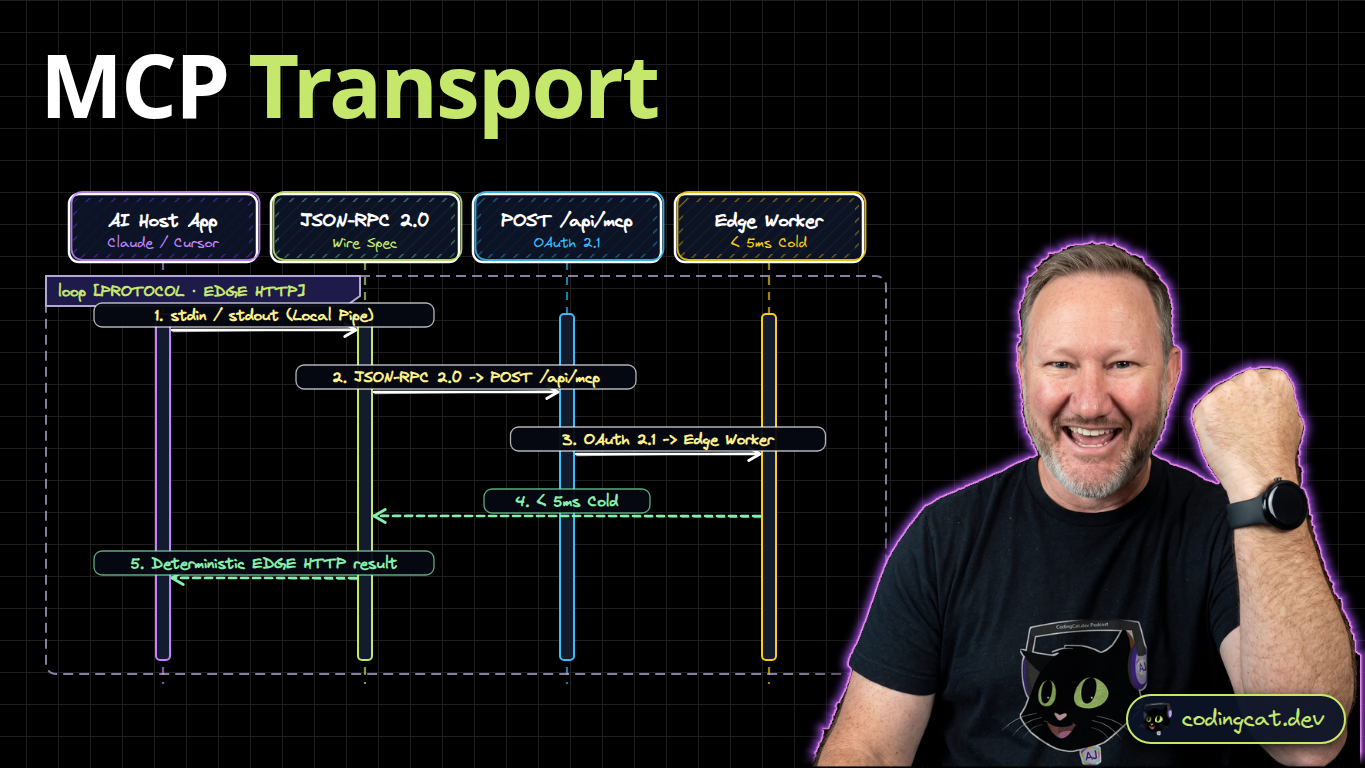
Move beyond toy local Stdio scripts. Learn how to architect, secure, and deploy remote Model Context Protocol (MCP) servers on Cloudflare Workers with OAuth 2.1, Better-Auth, WebMCP (RFC 9727), and Sanity Context Knowledge Bases.