WebMCP Explained: Exposing Browser-Native AI Tools with document.modelContext and Declarative HTML

how this post connects together.
Follow AJ from first principles to production-ready architecture.
If you have watched a browser AI agent try to book a flight, filter an e-commerce catalog, or search documentation using visual screen-scraping, you already know how painful it is. The agent takes a high-resolution screenshot or dumps 15,000 tokens of raw accessibility tree nodes, guesses a CSS selector, clicks the wrong button when a modal animates in, and burns through your token budget in four seconds. WebMCP (Web Model Context Protocol) fixes this at the web platform layer.
Co-developed within the W3C Web Machine Learning Community Group by engineers from Google and Microsoft, WebMCP brings Model Context Protocol primitives directly into the browser tab. Instead of forcing agents to reverse-engineer your DOM, your web application explicitly registers structured, JSON-Schema-typed tools via document.modelContext (or navigator.modelContext) and declarative HTML <form toolname="..."> attributes. Even better: we already run WebMCP in production across CodingCat.dev and alexpatterson.dev.
The Mental Model: Screen-Scraping vs. WebMCP Native Tool Contracts
When you build a traditional backend MCP server over stdio or HTTP SSE, you immediately hit the authentication wall: the remote MCP server does not have the user's active browser cookies, CSRF tokens, or in-memory React/Astro state. WebMCP executes inside the active browser tab, meaning registered tools automatically inherit the user's same-origin session while exposing a clean, deterministic JSON Schema contract to the browser assistant.
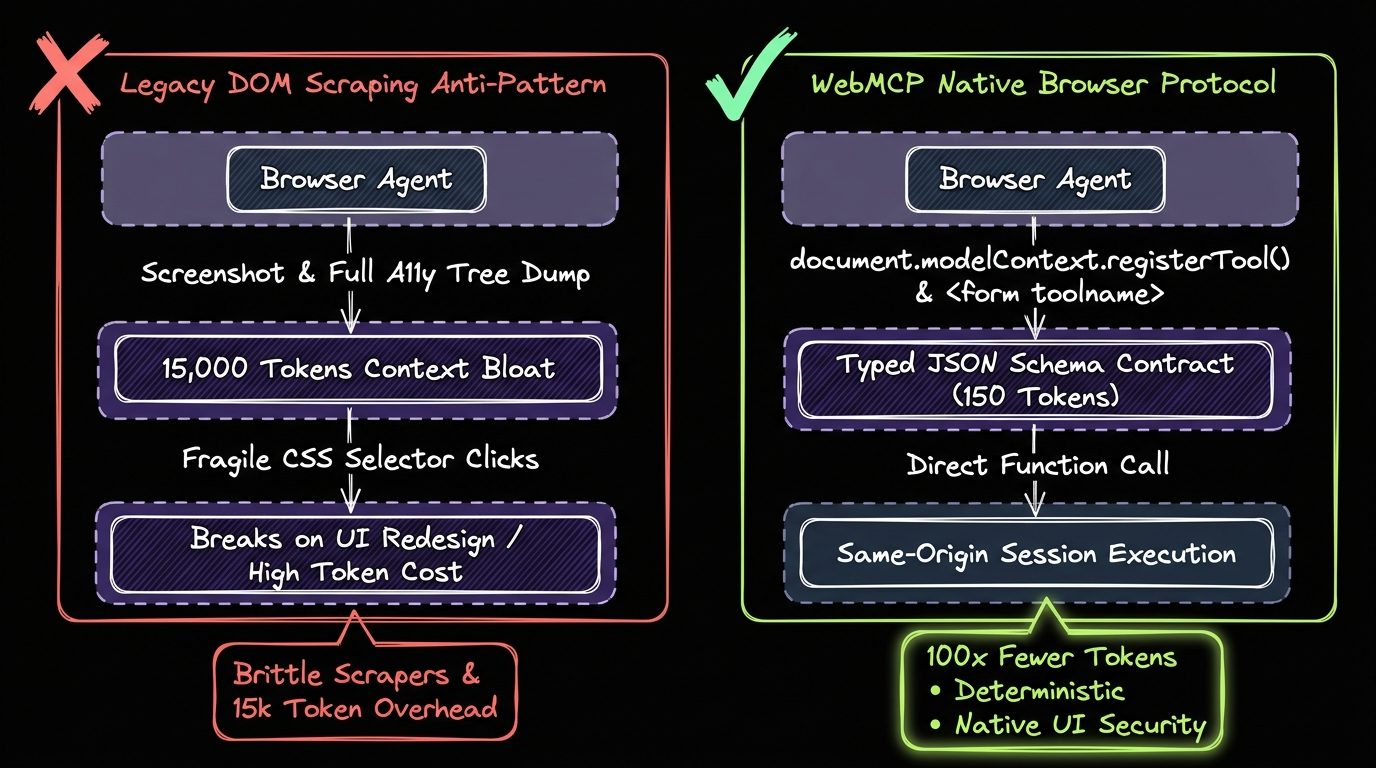
Comparing DOM Actuation, Backend MCP, and Browser WebMCP
| Dimension | DOM / Screenshot Scraping | Remote Backend MCP Server | Browser-Native WebMCP (Recommended) |
|---|---|---|---|
| Token Overhead per Turn | 10,000 to 25,000 tokens (DOM + Vision) | 150 to 400 tokens (JSON Schema) | 100 to 250 tokens (In-Tab JSON Schema) |
| Authentication & Session State | Shares tab cookies but clicks blindly | Requires separate OAuth 2.1 / API token flow | Inherits same-origin cookies and live UI state automatically |
| Resilience to UI Redesigns | Breaks whenever CSS classes or layouts shift | Decoupled from UI | 100% decoupled from visual CSS changes |
| Implementation Surface | Zero publisher control | Dedicated Node / Cloudflare Worker endpoint | document.modelContext.registerTool() or <form toolname> |
Pathway 1: The Imperative WebMCP API (registerTool & AbortController)
Early Chrome Canary prototypes exposed WebMCP under navigator.modelContext, while newer 2026 specification updates bind the context directly to the document lifecycle via document.modelContext. In production, always feature-detect both and pass an AbortController signal so Single-Page Application (SPA) or Astro View Transition navigations cleanly unregister tools when a component unmounts. Here is the exact pattern we ship in CodingCat.dev's BaseLayout.astro:
// src/lib/webmcp/register-codingcat-tools.ts
export interface WebMcpToolDefinition<TArgs = Record<string, unknown>> {
  name: string;
  description: string;
  annotations?: {
    readOnlyHint?: boolean;
    destructiveHint?: boolean;
    idempotentHint?: boolean;
    untrustedContentHint?: boolean;
  };
  inputSchema: {
    type: "object";
    properties: Record<string, unknown>;
    required?: string[];
  };
  execute: (args: TArgs) => Promise<unknown>;
}

interface ModelContextContainer {
  registerTool?: <T>(tool: WebMcpToolDefinition<T>, options?: { signal?: AbortSignal }) => void;
  unregisterTool?: (name: string) => void;
}

export function getBrowserModelContext(): ModelContextContainer | null {
  if (typeof document !== "undefined" && "modelContext" in document) {
    return (document as unknown as { modelContext: ModelContextContainer }).modelContext;
  }
  if (typeof navigator !== "undefined" && "modelContext" in navigator) {
    return (navigator as unknown as { modelContext: ModelContextContainer }).modelContext;
  }
  return null;
}

export function mountCodingCatWebMcpTools(): () => void {
  const mc = getBrowserModelContext();
  const controller = new AbortController();

  if (!mc || typeof mc.registerTool !== "function") {
    return () => controller.abort();
  }

  mc.registerTool<{ query: string; pillar?: "course" | "podcast" | "post" }>(
    {
      name: "search_content",
      description:
        "Search CodingCat.dev Courses, Podcasts, and Blog Posts by technical topic or framework.",
      annotations: {
        readOnlyHint: true,
        idempotentHint: true,
        untrustedContentHint: true,
      },
      inputSchema: {
        type: "object",
        properties: {
          query: {
            type: "string",
            description: "Search keyword (e.g. WebMCP, Gemini Nano, Astro, Sanity, Cloudflare D1)",
          },
          pillar: {
            type: "string",
            enum: ["course", "podcast", "post"],
            description: "Optional CodingCat.dev content pillar filter",
          },
        },
        required: ["query"],
      },
      execute: async ({ query, pillar }) => {
        const params = new URLSearchParams({ q: query });
        if (pillar) params.set("type", pillar);
        const response = await fetch(`/api/search?${params.toString()}`, {
          headers: { Accept: "application/json" },
          credentials: "same-origin",
        });
        if (!response.ok) {
          throw new Error(`Search API returned HTTP ${response.status}`);
        }
        return await response.json();
      },
    },
    { signal: controller.signal }
  );

  return () => controller.abort();
}
Pathway 2: The Declarative WebMCP API (HTML Form Annotations)
Not every page needs custom JavaScript to expose agent tools. If your application already uses semantic HTML <form> elements for filtering, search, or booking, you can add WebMCP declarative attributes (toolname, tooldescription, toolparamdescription, and toolautosubmit). The browser automatically parses your form inputs (type, pattern, required, and <select> options) into a structured JSON Schema for the agent:
<!-- Declarative WebMCP Tool Form (as shipped on alexpatterson.dev & codingcat.dev/demos/web-ai) -->
<form
  action="/speaker-kit.json"
  method="get"
  toolname="get_speaker_kit_json"
  tooldescription="Fetch Alex Patterson's programmatic speaker kit JSON including bios, talk abstracts, Sanity CDN headshots, and speaking ledger"
  toolautosubmit="true"
>
  <label for="speaker-kit-section">Speaker Kit Section</label>
  <select
    id="speaker-kit-section"
    name="section"
    required
    toolparamdescription="Speaker kit section to retrieve (all, bios, talks, headshots, ledger)"
  >
    <option value="all">Full Speaker Kit (JSON)</option>
    <option value="bios">Bios (6 Variants)</option>
    <option value="talks">Talk Abstracts</option>
    <option value="headshots">Press Headshots</option>
    <option value="ledger">Speaking Track Record</option>
  </select>
  <button type="submit">Download JSON</button>
</form>
AJ Pro-Tip: Security Annotations and Prompt Injection Guardrails
AJ Pro-Tip: Always Set readOnlyHint and untrustedContentHint Accurately. Because WebMCP tools execute with the user's active session cookies, a malicious third-party comment on a page could attempt indirect prompt injection to trick a browser agent into invoking a state-mutating tool. Always setreadOnlyHint: trueon safe query tools so the browser agent knows it can run them without confirmation, and omitreadOnlyHint(or setdestructiveHint: true) on checkout, deletion, or credential-modifying actions so Chrome prompts the user for explicit human-in-the-loop approval.
Try the Live Browser AI & WebMCP Playground
You can test every pattern from this article live right now in our interactive Web AI & WebMCP Playground on CodingCat.dev, or inspect our production discovery manifests on the Developers & Agent APIs page. If you are organizing a developer conference or engineering summit, check out my Web AI talk abstracts on alexpatterson.dev and explore more hands-on Courses, Podcasts, and Blog Posts right here on CodingCat.dev.