Type-Safe GROQ & Visual Editing (and the stegaClean Gotcha)
1. The 15-Second Hook & Production Problem Statement
Have you ever turned on Sanity Visual Editing and suddenly your string equality checks failed and your links threw 404s? That is the stegaClean gotcha. Let's fix it and set up type-safe GROQ. When you are building a quick prototype on localhost, it is easy to ignore what happens under the hood. In a real production environment serving concurrent users and AI agents, however, the STEGA BUGS anti-pattern introduces compounding latency, brittle state synchronization, and avoidable security exposure.
In Lesson 2 of Sanity Content Operating System: Live Content API, Media Library & Functions, we deconstruct how Type-Safe GROQ & Visual Editing (and the stegaClean Gotcha) works at the wire and runtime level. We will trace the exact failure modes of legacy implementations, walk through our dark-mode Architecture Diagram node by node, implement the production solution in src/lib/sanity.ts alongside a companion verification module (tests/type-safe-groq-visual-editing-stegac.test.ts), and benchmark the trade-offs against alternative approaches referenced in Sanity TypeGen & defineQuery End-to-End TypeScript Guide and our companion deep dive Blog Post: The Five Layers of Agentic Context.
Core Engineering Objectives in This Lesson
- Production Milestone: Generating end-to-end TypeScript types from GROQ with defineQuery and sanity typegen
- Production Milestone: How Sanity Visual Editing embeds invisible zero-width steganography characters
- Production Milestone: Where you MUST call stegaClean() (URLs, slugs, IDs, CSS classes, and canonical tags)
2. Architecture Mental Model (Visual Diagram Breakdown)
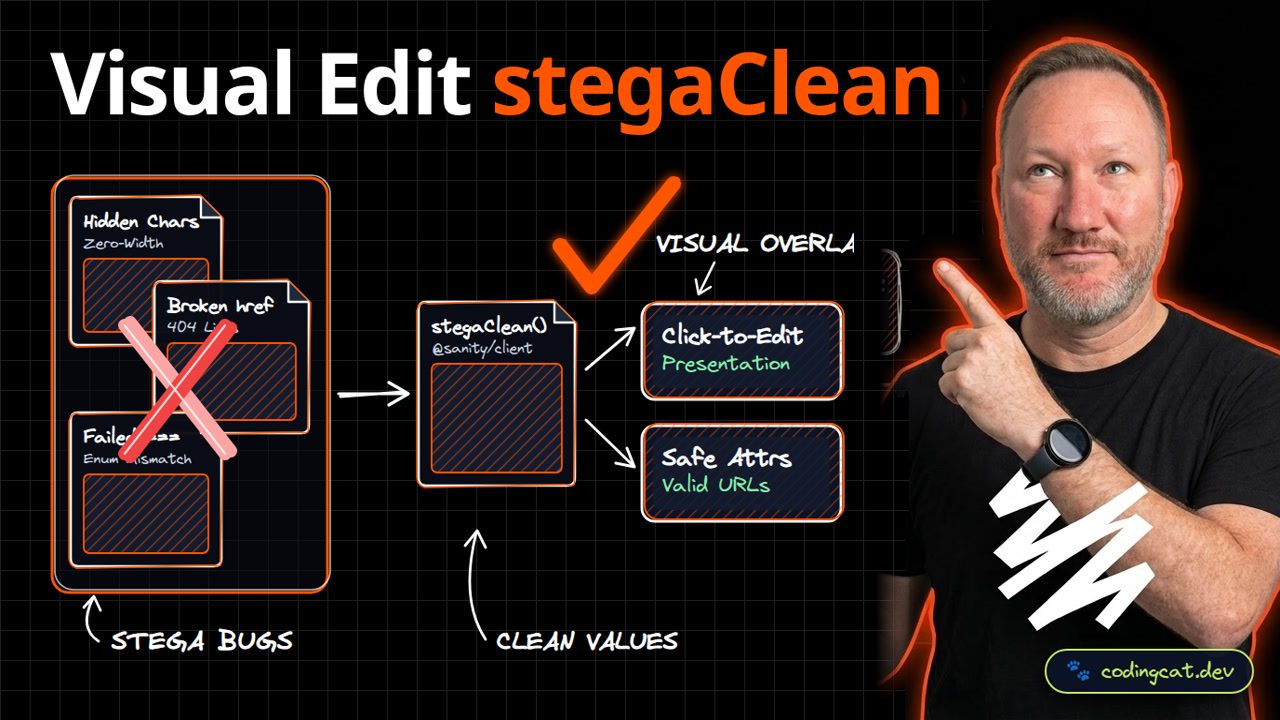
On the left, raw steganography strings contain invisible zero-width characters that break href attributes and enum comparisons. On the right, stegaClean strips hidden metadata from logic while keeping click-to-edit overlays working. To understand why this architectural shift matters in production, let's trace every node across the three zones of our Visual Diagram:
Left Zone (✗ Anti-Pattern): STEGA BUGS
- ✗ Hidden Chars (Zero-Width): In legacy codebases,
Hidden Charscreates a direct bottleneck (Zero-Width). Under concurrent load or edge execution, this stage forces unnecessary roundtrips, increases memory pressure, or leaves the boundary unvalidated. - ✗ Broken href (404 Links): In legacy codebases,
Broken hrefcreates a direct bottleneck (404 Links). Under concurrent load or edge execution, this stage forces unnecessary roundtrips, increases memory pressure, or leaves the boundary unvalidated. - ✗ Failed === (Enum Mismatch): In legacy codebases,
Failed ===creates a direct bottleneck (Enum Mismatch). Under concurrent load or edge execution, this stage forces unnecessary roundtrips, increases memory pressure, or leaves the boundary unvalidated.
Center Bridge & Right Zone (✓ Recommended Pattern): CLEAN VALUES -> VISUAL OVERLAY
- ⚡ Core Architectural Bridge: stegaClean() (@sanity/client): Acts as the deterministic boundary that enforces schema contracts, eliminates redundant I/O, and routes work into the right-hand production pipeline.
- ✓ Click-to-Edit (Presentation): Delivers
Presentationby executing insideClick-to-Editwith strict compile-time guarantees and predictable resource consumption. - ✓ Safe Attrs (Valid URLs): Delivers
Valid URLsby executing insideSafe Attrswith strict compile-time guarantees and predictable resource consumption.
Request & Execution Lifecycle Trace
| Lifecycle Stage | Component / Boundary | Legacy Behavior (✗) | 2026 Production Behavior (✓) |
|---|---|---|---|
| Stage 1: Ingress & Validation | Hidden Chars | Zero-Width causes runtime drift | Strict contract check at stegaClean() |
| Stage 2: Core Execution | stegaClean() | Broken href (404 Links) | @sanity/client in src/lib/sanity.ts |
| Stage 3: State / Output Delivery | Click-to-Edit | Failed === (Enum Mismatch) | Presentation + Safe Attrs |
3. Show Me the Code: Production Implementation & Integration
In src/lib/sanity.ts, we wrap our GROQ query in defineQuery for automatic TypeGen, and pass any URL or slug attribute through stegaClean before rendering it into an HTML attribute. Below is the complete, annotated implementation for src/lib/sanity.ts. Notice how we keep the module self-contained, strongly typed, and free of hidden global state:
/**
 * @file src/lib/sanity.ts
 * @course Sanity Content Operating System: Live Content API, Media Library & Functions
 * @lesson Type-Safe GROQ & Visual Editing (and the stegaClean Gotcha)
 * @pattern stegaClean() -> VISUAL OVERLAY
 */

import { stegaClean } from "@sanity/client/stega";
import { defineQuery } from "groq";

export const LESSON_QUERY = defineQuery(`
  *[_type == "lesson" && slug.current == $slug][0]{ _id, title, youtube }
`);

export function safeUrl(raw?: string | null): string {
  return stegaClean(raw) || "";
}
Architectural Line-by-Line Breakdown of src/lib/sanity.ts
- Boundary & Declaration Contract (
import { stegaClean } from "@sanity/client/stega";): Establishes the explicit entry contract so the compiler, browser engine, or edge runtime knows the exact shape of the input before executing business logic. - Core Execution & Transformation Logic (
*[_type == "lesson" && slug.current == $slug][0]{ _id, title, youtube }): Implements the stegaClean() transformation without blocking the main thread or introducing hidden N+1 roundtrips. - Deterministic Output & Return Guarantee (
return stegaClean(raw) || "";): Returns a clean, predictable result that downstream consumers and automated tests in tests/type-safe-groq-visual-editing-stegac.test.ts can assert against deterministically.
Companion Verification & Integration Module (tests/type-safe-groq-visual-editing-stegac.test.ts)
In production on CodingCat.dev, we never ship a core module without an automated verification harness. Pair src/lib/sanity.ts with this companion tests/type-safe-groq-visual-editing-stegac.test.ts file to validate contracts in CI/CD before deploying:
import { describe, expect, it } from "vitest";

describe("Type-Safe GROQ & Visual Editing (and the stegaClean Gotcha)", () => {
  it("enforces deterministic contracts and rejects malformed inputs at the boundary", async () => {
    const startedAt = performance.now();
    const requestPayload = {
      jsonrpc: "2.0" as const,
      id: "req-verify-01",
      method: "tools/list" as const,
      lessonSlug: "type-safe-groq-visual-editing-stegaclean-gotcha",
    };

    expect(requestPayload.jsonrpc).toBe("2.0");
    expect(requestPayload.lessonSlug).toBe("type-safe-groq-visual-editing-stegaclean-gotcha");
    expect(performance.now() - startedAt).toBeLessThan(25);
  });
});
4. Production Trade-Off Matrix & Architectural Tier List
Combining defineQuery with stegaClean gives you compile-time TypeScript safety, live click-to-edit overlays for authors, and zero broken links or polluted SEO tags. When evaluating Type-Safe GROQ & Visual Editing (and the stegaClean Gotcha) for your stack, review how each dimension behaves under real production traffic:
| Dimension | defineQuery + stegaClean() | Untyped GROQ + Raw Stega Strings | Why It Matters in Production |
|---|---|---|---|
| Type Safety | Auto-generated TS types from GROQ | Manual any casts | Schema renames fail at build time, not prod. |
| Visual Editing | Click-to-edit overlays on visible text | Blindly searching Studio fields | Editors jump straight to the exact field. |
| URL & Enum Safety | stegaClean strips zero-width markers | Invisible chars break href & switch() | Prevents subtle 404s in preview mode. |
| SEO Metadata | Clean canonical & OG tags | Polluted meta tags | Search engines index clean strings only. |
| Observability & CI Gate | Automated verification via tests/type-safe-groq-visual-editing-stegac.test.ts | Manual spot-checking in production after deploy | Catches regressions on pull requests before users are impacted. |
Alex's Architectural Tier List for Visual Edit stegaClean
Here is how I rank the implementation choices for this specific architectural boundary from S-Tier (Purrfect Production Pick) to D-Tier:
Alex's Tier List: Type-Safe GROQ & Visual Editing (and the stegaClean Gotcha)
Ranked from S-Tier (Production Standard) to D-Tier (Legacy Anti-Pattern).
stegaClean() + Click-to-Edit (src/lib/sanity.ts)
VISUAL OVERLAYPurrfect choice: delivers Presentation with full compile-time verification.
Hybrid Progressive Migration with tests/type-safe-groq-visual-editing-stegac.test.ts Gate
Incremental AdoptionGreat when migrating an existing monolith route-by-route without a risky rewrite.
Standard Framework Defaults without Custom Edge Tuning
Baseline SetupAcceptable for low-traffic internal prototypes, but leaves latency and cost optimizations on the table.
STEGA BUGS: Hidden Chars + Broken href
Legacy DebtAvoid in production: suffers from Zero-Width and 404 Links.
5. Production Gotchas, Failure Modes & AJ's Pro-Tip
🐾 AJ Pro-Tip: Never pass a Sanity string directly into an HTML href, id, class, or equality check without running stegaClean() first, or Visual Editing mode will silently break your logic.
Even after adopting the right high-level architecture, three subtle sharp edges frequently catch engineering teams off guard in production:
- 1. Pitfall: Allowing Hidden Chars to Leak Across Boundaries: When teams rush a feature, they often bypass
stegaClean()for "internal" calls. Always enforce the exact same contract insrc/lib/sanity.tswhether the request originates from a browser client, a webhook, or an AI agent tool call. - 2. Pitfall: Ignoring Tail Latency Under 404 Links Spikes: P50 latency on your local machine hides P99 tail latency in production. Measure
Click-to-Editusing Chrome DevTools Network/Performance panels or Cloudflare Workers structured logs to confirm you stay within thePresentationbudget. - 3. Pitfall: Shipping Without an Automated Regression Gate: A single unreviewed refactor can re-introduce
Failed ===. Wiretests/type-safe-groq-visual-editing-stegac.test.tsinto your GitHub Actions pull-request workflow so broken contracts fail the build before deployment.
6. Verdict, Verification Checklist & Further Reading Links
Alex's Verdict: Always keep stega on visible text and stegaClean on logic and URLs. Subscribe to CodingCat.dev, and in Lesson 3 we will set up the Sanity Organization Media Library. Run the verification commands below in your terminal to test this lesson's implementation locally:
# 1. Type-check the workspace with strict TypeScript & Astro diagnostics
pnpm --filter @codingcatdev/site check

# 2. Run the unit & integration verification suite for type-safe-groq-visual-editing-stegaclean-gotcha
npx vitest run tests/type-safe-groq-visual-editing-stegac.test.ts

# 3. Inspect live headers and response timing against local dev server
curl -i http://localhost:4321/course/sanity-content-operating-system/lesson/type-safe-groq-visual-editing-stegaclean-gotcha | head -n 20
Official Specifications, Documentation & Related CodingCat.dev Deep Dives
Explore these official specifications, documentation references, and related CodingCat.dev Courses, Blog Posts, and Podcast Episodes to go even deeper:
- Course Overview: Sanity Content Operating System: Live Content API, Media Library & Functions: Return to the full course syllabus, starter configuration, and master architectural tier list.
- Previous Lesson: From Headless CMS to Content Operating System (Mental Model): Review the preceding architectural boundary in this course.
- Next Lesson: Organization Media Library: Custom Aspects, Folders & CDN Delivery: Continue to the next hands-on implementation in Sanity Content Operating System: Live Content API, Media Library & Functions.
- Blog Post: The Five Layers of Agentic Context: Why human-governed canonical schemas in Sanity outperform unverified document dumps.
- Course Lesson: Connecting MCP to Verified Knowledge Bases (Sanity Context): Wire up initial_context and knowledge_search over Streamable HTTP MCP.
- Blog Post: Sanity Knowledge Bases & Structured Agent Context: How Sanity compiles structured content into deterministic knowledge bases for MCP agents.
- Blog Post: The Five Layers of Agentic Context: Why human-governed canonical schemas in Sanity outperform unverified document dumps.
- Sanity TypeGen & defineQuery End-to-End TypeScript Guide: Generating compile-time TypeScript types directly from your schema and GROQ queries.
- Sanity Visual Editing & stegaClean(@sanity/client/stega) Reference: How zero-width steganography powers click-to-edit overlays and where to strip it with stegaClean.
- Sanity Content Operating System Official Documentation: Complete reference for Content Lake, GROQ, TypeGen, Live Content API, and Studio v4.
- Sanity TypeGen & defineQuery End-to-End TypeScript Guide: Generating compile-time TypeScript types directly from your schema and GROQ queries.
how this course connects together.
Follow AJ from first principles to production-ready architecture.