


The Odin Project 5: Advanced HTML, CSS View Transitions & WCAG Accessibility

1. Production Architecture Problem & Why We Built This Course
Build 60fps GPU-accelerated animations, multi-page Astro View Transitions, WCAG AAA focus rings, and accessible native <dialog> and Popover components. In production engineering teams, the gap between a quick weekend demo and a resilient, multi-tenant system comes down to three architectural boundaries: cold-start latency, compile-time contract validation, and predictable operational cost. Throughout The Odin Project 5: Advanced HTML, CSS View Transitions & WCAG Accessibility, we strip away marketing buzzwords and build the exact TypeScript, edge compute, and structured data patterns that power CodingCat.dev in production.
Every lesson in this course pairs a dark-mode Architecture Diagram (contrasting the legacy anti-pattern on the left against the recommended 2026 production pattern on the right) with copy-pasteable TypeScript modules, automated verification checks, and an explicit Trade-Off Matrix. Whether you are reading the official MDN Web Docs: Core Web Specifications (HTML5, CSS, DOM, Fetch & HTTP) or pairing this course with our deep dive on Course: The Zero-Cold-Start Edge Stack (Astro 7, Cloudflare Workers, D1 & Better-Auth), you can apply every pattern directly to your own repository today.
🐾 AJ's Course Architecture Rule: Never adopt a tool just because it trended on social media. Measure its cold start in milliseconds, verify its TypeScript schema boundary at compile time, and check what happens to your cloud bill when traffic spikes 100x.
2. Lesson-by-Lesson Architectural Walkthrough (2 Lessons)
Work through the lessons in sequence to build the complete system from first principles, or jump directly to the specific architectural boundary you are solving right now:
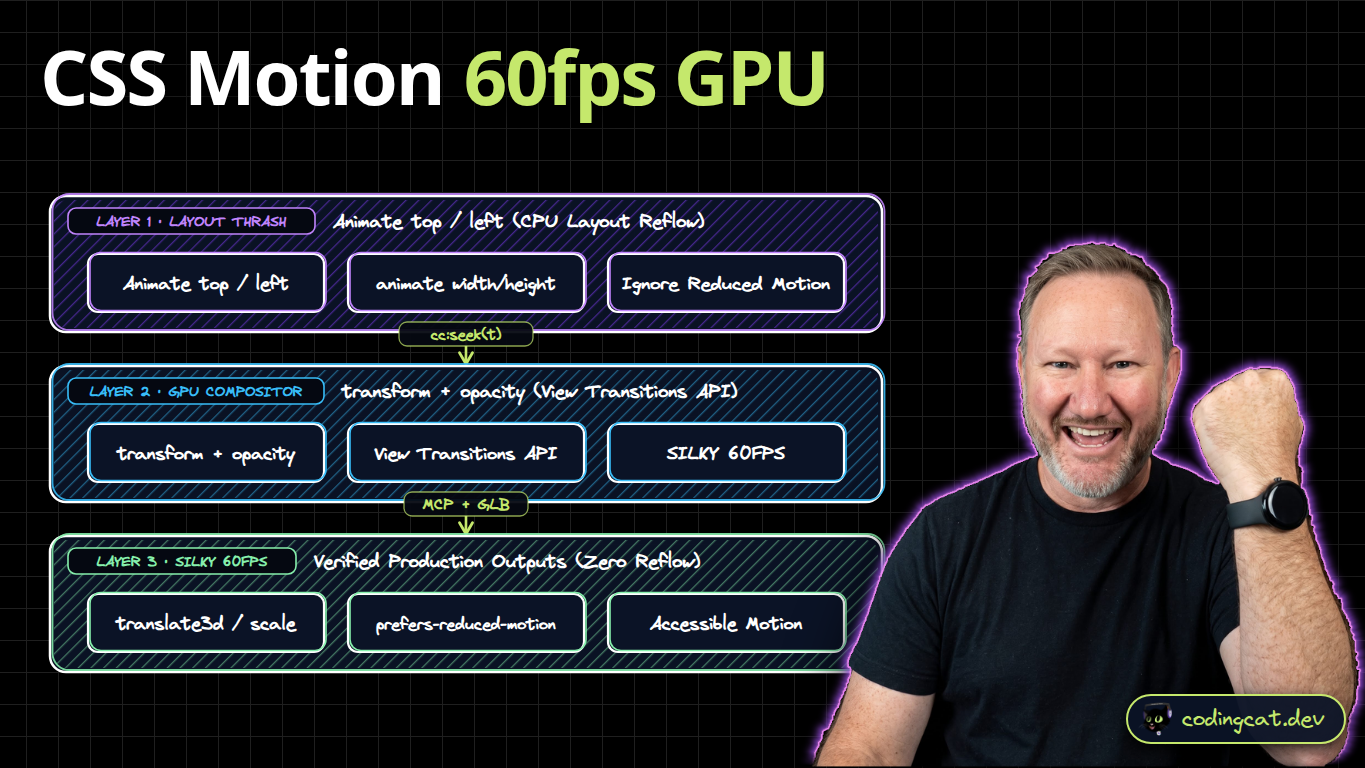
- Lesson 1: 60fps GPU Compositor Animations & the View Transitions API: Replaces the
LAYOUT THRASH (Animate top / left, animate width/height, Ignore Reduced Motion)anti-pattern withtransform + opacity -> translate3d / scale + prefers-reduced-motioninsidesrc/styles/motion.css. Animating CSS width, height, or top forces the browser to recalculate the layout of the entire page on every single frame. Here is how to lock animations to 60fps on the GPU and use the View Transitions API. - Lesson 2: WCAG Contrast, :focus-visible Rings & Native <dialog> Modals: Replaces the
CUSTOM DIV MODAL (z-index: 99999, Broken Focus Trap, outline: none)anti-pattern with<dialog> + showModal() -> Auto Focus Trap + :focus-visible Ringinsidesrc/components/Modal.html. Shipping a custom div modal with z-index ninety-nine thousand almost always forgets to trap keyboard Tab focus or support the Escape key. Let's replace custom modal libraries with native HTML dialog and focus-visible.
3. Alex's 2026 Ecosystem & Architectural Tier List
Before writing a single line of configuration, you need to know how the available platforms and patterns stack up in real production environments. Here is how I rank the ecosystem from S-Tier (our default production choice on CodingCat.dev) down to D-Tier anti-patterns to avoid:
Alex's Web Motion & Accessible UI Primitives Tier List (2026)
Ranked from S-Tier (2026 Production Standard) to D-Tier (Legacy Anti-Patterns) across performance, accessibility, type safety, and maintainability.
GPU Compositor Motion (transform & opacity) + CSS @view-transition ↗
60fps Hardware-Accelerated MotionAnimates strictly on the GPU compositor thread and morphs elements across multi-page Astro navigations while honoring prefers-reduced-motion.
Native <dialog>.showModal() + Popover API + :focus-visible Rings ↗
Browser Top-Layer AccessibilityRenders modals in the browser Top Layer above all z-index contexts, marks background content inert automatically, traps Tab focus, and closes on Escape.
Animating top/left/width/height + Custom Div Modal with outline: none
Janky & Inaccessible Anti-PatternForces full-document CPU layout recalculations on every frame and traps or loses keyboard users behind invisible focus states.
4. Production Starter Configuration & Local Setup
To follow along with the code examples in The Odin Project 5: Advanced HTML, CSS View Transitions & WCAG Accessibility, start with this baseline package.json configuration. It enables strict TypeScript verification, observability tracing, and local development bindings that match production 1-to-1:
{
  "name": "course-odin-5-advanced-html-css",
  "private": true,
  "type": "module",
  "scripts": {
    "dev": "astro dev",
    "build": "astro check && astro build",
    "test": "vitest run",
    "test:e2e": "playwright test"
  },
  "dependencies": {
    "astro": "^6.0.0",
    "hono": "^4.11.0",
    "zod": "^4.0.0"
  },
  "devDependencies": {
    "@playwright/test": "^1.58.0",
    "typescript": "^5.9.0",
    "vitest": "^4.0.0"
  }
}
5. Course-Wide Production Trade-Off Matrix
Every architectural decision involves trade-offs. Use this reference table during design reviews with your team to justify why we choose edge-native TypeScript, explicit schema validation, and deterministic workflows over legacy alternatives:
| Architectural Dimension | 2026 CodingCat.dev Course Pattern | Legacy Industry Default | Production Impact at Scale |
|---|---|---|---|
| Compute & Cold Starts | V8 Isolates / Native Browser Compositor (< 5ms) | Heavy Container VMs / Main-Thread JS Bloat (500ms+) | Eliminates tail-latency spikes on every request and interaction. |
| Contract & Type Safety | End-to-End TypeScript + Zod / GROQ TypeGen | Untyped JSON payloads & manual interface drift | Catches breaking schema changes in CI before deployment. |
| State & Database Topology | Cloudflare D1 Batch / Durable SQLite / Sanity Content Lake | Exhausted TCP pools & unindexed N+1 loops | Predictable sub-10ms reads with zero connection pool errors. |
| Security & Multi-Tenancy | OAuth 2.1 PKCE + Better-Auth Scoped Sessions | Shared static API keys & unescaped DOM strings | Zero-trust tenant isolation and $0 per-MAU SaaS tax. |
| AI & Agent Readiness | Streamable HTTP MCP + WebMCP + RFC 9727 + Daily Spend Caps | 20k-token headless DOM scraping & uncapped retry loops | Cuts token spend by 95%+ while preventing runaway bills. |
6. Official Specifications, Docs & Related CodingCat.dev Deep Dives
Bookmark these official specifications and related CodingCat.dev Courses, Blog Posts, and Podcast Episodes as you work through the lessons:
- Course: The Zero-Cold-Start Edge Stack (Astro 7, Cloudflare Workers, D1 & Better-Auth): See how web fundamentals scale into a sub-10ms global production architecture.
- Course: MCP in Production (Building & Securing Model Context Protocol Servers): Apply HTTP, JSON-RPC 2.0, OAuth 2.1, and TypeScript schemas to AI agent tool servers.
- Course: Full-Stack AI Agents in TypeScript: Build deterministic TypeScript state machines, hybrid browser AI routers, and CI evals.
- Blog Post: Accessibility Best Practices for HTML & CSS: Practical semantic DOM landmarks, keyboard focus management, and WCAG contrast rules.
- Podcast Episode: GenAI for Engineers: What's Real, What's Not, and What's Coming: How strong web platform fundamentals make you 10x more effective when pair-programming with AI.
- MDN Web Docs: Core Web Specifications (HTML5, CSS, DOM, Fetch & HTTP): Canonical browser specifications, compatibility tables, and interactive API references.
- web.dev by Chrome: Core Web Vitals, Accessibility & Modern CSS Patterns: Production engineering guides for LCP, INP, CLS, responsive layouts, and modern forms.
- TypeScript Official Handbook & Strict Compiler Reference: Type narrowing, discriminated unions, generics, and zero-runtime-overhead type safety.
- The Odin Project Open-Source Curriculum & Community: Open-source foundational project prompts complemented by CodingCat.dev's 2026 TypeScript & Edge lessons.
Ready to write code? Jump straight into Lesson 1: 60fps GPU Compositor Animations & the View Transitions API →
course lessons.
Core Architecture & Implementation
- 1.160fps GPU Compositor Animations & the View Transitions API
Animating CSS width, height, or top forces the browser to recalculate the layout of the entire page on every single frame. Here is how to lock animations to 60fps on the GPU and use the View Transitions API.
CSS▶ Video + LessonStart Lesson → - 1.2WCAG Contrast, :focus-visible Rings & Native <dialog> Modals
Shipping a custom div modal with z-index ninety-nine thousand almost always forgets to trap keyboard Tab focus or support the Escape key. Let's replace custom modal libraries with native HTML dialog and focus-visible.
HTMLAccessibility▶ Video + LessonStart Lesson →
how this course connects together.
Follow AJ from first principles to production-ready architecture.