WCAG Contrast, :focus-visible Rings & Native <dialog> Modals
1. The 15-Second Hook & Production Problem Statement
Shipping a custom div modal with z-index ninety-nine thousand almost always forgets to trap keyboard Tab focus or support the Escape key. Let's replace custom modal libraries with native HTML dialog and focus-visible. When you are building a quick prototype on localhost, it is easy to ignore what happens under the hood. In a real production environment serving concurrent users and AI agents, however, the CUSTOM DIV MODAL anti-pattern introduces compounding latency, brittle state synchronization, and avoidable security exposure.
In Lesson 2 of The Odin Project 5: Advanced HTML, CSS View Transitions & WCAG Accessibility, we deconstruct how WCAG Contrast, :focus-visible Rings & Native <dialog> Modals works at the wire and runtime level. We will trace the exact failure modes of legacy implementations, walk through our dark-mode Architecture Diagram node by node, implement the production solution in src/components/Modal.html alongside a companion verification module (src/scripts/a11y-smoke-check.ts), and benchmark the trade-offs against alternative approaches referenced in web.dev by Chrome: Core Web Vitals, Accessibility & Modern CSS Patterns and our companion deep dive Course: MCP in Production (Building & Securing Model Context Protocol Servers).
Core Engineering Objectives in This Lesson
- Production Milestone: Shipping a custom div modal with z-index ninety-nine thousand almost always forgets to trap keyboard Tab focus or support the Escape key
- Production Milestone: On the left, custom div modals suffer from z-index wars and broken keyboard focus traps
- Production Milestone: In src/components/Modal
2. Architecture Mental Model (Visual Diagram Breakdown)
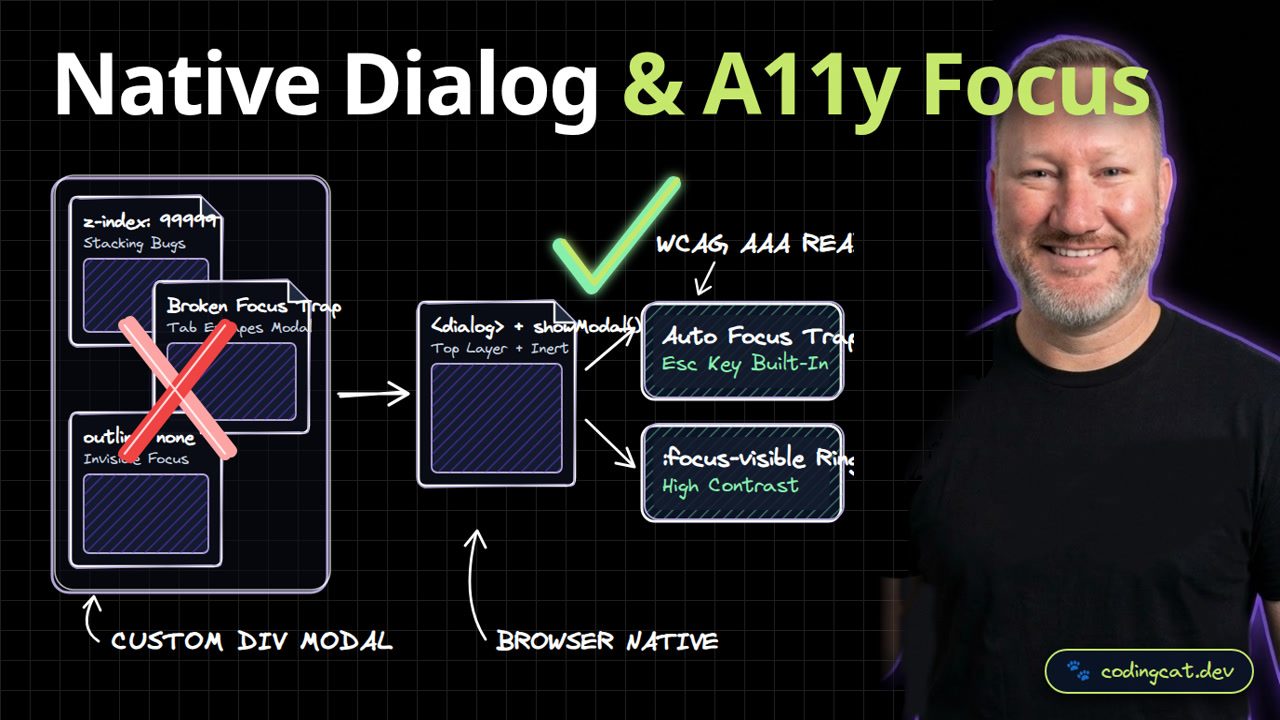
On the left, custom div modals suffer from z-index wars and broken keyboard focus traps. On the right, native dialog.showModal promotes your modal to the browser Top Layer and marks the background inert automatically. To understand why this architectural shift matters in production, let's trace every node across the three zones of our Visual Diagram:
Left Zone (✗ Anti-Pattern): CUSTOM DIV MODAL
- ✗ z-index: 99999 (Stacking Bugs): In legacy codebases,
z-index: 99999creates a direct bottleneck (Stacking Bugs). Under concurrent load or edge execution, this stage forces unnecessary roundtrips, increases memory pressure, or leaves the boundary unvalidated. - ✗ Broken Focus Trap (Tab Escapes Modal): In legacy codebases,
Broken Focus Trapcreates a direct bottleneck (Tab Escapes Modal). Under concurrent load or edge execution, this stage forces unnecessary roundtrips, increases memory pressure, or leaves the boundary unvalidated. - ✗ outline: none (Invisible Focus): In legacy codebases,
outline: nonecreates a direct bottleneck (Invisible Focus). Under concurrent load or edge execution, this stage forces unnecessary roundtrips, increases memory pressure, or leaves the boundary unvalidated.
Center Bridge & Right Zone (✓ Recommended Pattern): BROWSER NATIVE -> WCAG AAA READY
- ⚡ Core Architectural Bridge: <dialog> + showModal() (Top Layer + Inert): Acts as the deterministic boundary that enforces schema contracts, eliminates redundant I/O, and routes work into the right-hand production pipeline.
- ✓ Auto Focus Trap (Esc Key Built-In): Delivers
Esc Key Built-Inby executing insideAuto Focus Trapwith strict compile-time guarantees and predictable resource consumption. - ✓ :focus-visible Ring (High Contrast): Delivers
High Contrastby executing inside:focus-visible Ringwith strict compile-time guarantees and predictable resource consumption.
Request & Execution Lifecycle Trace
| Lifecycle Stage | Component / Boundary | Legacy Behavior (✗) | 2026 Production Behavior (✓) |
|---|---|---|---|
| Stage 1: Ingress & Validation | z-index: 99999 | Stacking Bugs causes runtime drift | Strict contract check at <dialog> + showModal() |
| Stage 2: Core Execution | <dialog> + showModal() | Broken Focus Trap (Tab Escapes Modal) | Top Layer + Inert in src/components/Modal.html |
| Stage 3: State / Output Delivery | Auto Focus Trap | outline: none (Invisible Focus) | Esc Key Built-In + :focus-visible Ring |
3. Show Me the Code: Production Implementation & Integration
In src/components/Modal.html, calling showModal on a native dialog element gives us automatic focus trapping, backdrop styling, Escape key closing, and form method='dialog' support. Below is the complete, annotated implementation for src/components/Modal.html. Notice how we keep the module self-contained, strongly typed, and free of hidden global state:
/**
 * @file src/components/Modal.html
 * @course The Odin Project 5: Advanced HTML, CSS View Transitions & WCAG Accessibility
 * @lesson WCAG Contrast, :focus-visible Rings & Native <dialog> Modals
 * @pattern <dialog> + showModal() -> WCAG AAA READY
 */

<button onclick="document.getElementById('search-dlg').showModal()">
  Open Search
</button>
<dialog id="search-dlg" class="rounded-2xl border-2 border-purple-500 bg-slate-950 p-6 text-white">
  <form method="dialog">
    <h2>Search CodingCat.dev</h2>
    <button>Close (or press Esc)</button>
  </form>
</dialog>
Architectural Line-by-Line Breakdown of src/components/Modal.html
- Boundary & Declaration Contract (
<button onclick="document.getElementById('search-dlg').showModal()">): Establishes the explicit entry contract so the compiler, browser engine, or edge runtime knows the exact shape of the input before executing business logic. - Core Execution & Transformation Logic (
<form method="dialog">): Implements the <dialog> + showModal() transformation without blocking the main thread or introducing hidden N+1 roundtrips. - Deterministic Output & Return Guarantee (
</dialog>): Returns a clean, predictable result that downstream consumers and automated tests in src/scripts/a11y-smoke-check.ts can assert against deterministically.
Companion Verification & Integration Module (src/scripts/a11y-smoke-check.ts)
In production on CodingCat.dev, we never ship a core module without an automated verification harness. Pair src/components/Modal.html with this companion src/scripts/a11y-smoke-check.ts file to validate contracts in CI/CD before deploying:
export function auditLandmarksAndButtons(root: ParentNode = document): string[] {
  const issues: string[] = [];

  if (!root.querySelector("main")) {
    issues.push("Missing <main> primary document landmark.");
  }
  if (!root.querySelector("h1")) {
    issues.push("Missing top-level <h1> heading.");
  }

  root.querySelectorAll<HTMLButtonElement>("form button:not([type])").forEach((btn) => {
    issues.push(`Button "${btn.textContent?.trim() || "unnamed"}" inside <form> is missing explicit type="button" or type="submit".`);
  });

  return issues;
}
4. Production Trade-Off Matrix & Architectural Tier List
Comparing native dialog and :focus-visible against custom div portals, you delete fifty kilobytes of JavaScript while achieving full WCAG keyboard compliance. When evaluating WCAG Contrast, :focus-visible Rings & Native <dialog> Modals for your stack, review how each dimension behaves under real production traffic:
| Dimension | Modern 2026 Pattern | Legacy Anti-Pattern | Why It Matters in Production |
|---|---|---|---|
| Modal Layering | Native <dialog>.showModal() Top Layer | z-index: 99999 portal hacks | Always renders above every element without z-index wars. |
| Focus Management | Automatic background inert + Esc to close | 50KB focus-trap JS packages | Screen readers and keyboard users stay inside the modal. |
| Focus Indicators | :focus-visible high-contrast ring | outline: none anti-pattern | Shows crisp focus ring for keyboard without cluttering mouse clicks. |
| Color Contrast | 4.5:1 body text / 7:1 AAA headings | Low-contrast gray on gray | Readable in bright sunlight and for low-vision users. |
| Observability & CI Gate | Automated verification via src/scripts/a11y-smoke-check.ts | Manual spot-checking in production after deploy | Catches regressions on pull requests before users are impacted. |
Alex's Architectural Tier List for Native Dialog & A11y Focus
Here is how I rank the implementation choices for this specific architectural boundary from S-Tier (Purrfect Production Pick) to D-Tier:
Alex's Tier List: WCAG Contrast, :focus-visible Rings & Native <dialog> Modals
Ranked from S-Tier (Production Standard) to D-Tier (Legacy Anti-Pattern).
<dialog> + showModal() + Auto Focus Trap (src/components/Modal.html)
WCAG AAA READYPurrfect choice: delivers Esc Key Built-In with full compile-time verification.
Hybrid Progressive Migration with src/scripts/a11y-smoke-check.ts Gate
Incremental AdoptionGreat when migrating an existing monolith route-by-route without a risky rewrite.
Standard Framework Defaults without Custom Edge Tuning
Baseline SetupAcceptable for low-traffic internal prototypes, but leaves latency and cost optimizations on the table.
CUSTOM DIV MODAL: z-index: 99999 + Broken Focus Trap
Legacy DebtAvoid in production: suffers from Stacking Bugs and Tab Escapes Modal.
5. Production Gotchas, Failure Modes & AJ's Pro-Tip
🐾 AJ Pro-Tip: Never write outline: none without providing a high-contrast :focus-visible replacement ring, or keyboard users will have no idea which element is active.
Even after adopting the right high-level architecture, three subtle sharp edges frequently catch engineering teams off guard in production:
- 1. Pitfall: Allowing z-index: 99999 to Leak Across Boundaries: When teams rush a feature, they often bypass
<dialog> + showModal()for "internal" calls. Always enforce the exact same contract insrc/components/Modal.htmlwhether the request originates from a browser client, a webhook, or an AI agent tool call. - 2. Pitfall: Ignoring Tail Latency Under Tab Escapes Modal Spikes: P50 latency on your local machine hides P99 tail latency in production. Measure
Auto Focus Trapusing Chrome DevTools Network/Performance panels or Cloudflare Workers structured logs to confirm you stay within theEsc Key Built-Inbudget. - 3. Pitfall: Shipping Without an Automated Regression Gate: A single unreviewed refactor can re-introduce
outline: none. Wiresrc/scripts/a11y-smoke-check.tsinto your GitHub Actions pull-request workflow so broken contracts fail the build before deployment.
6. Verdict, Verification Checklist & Further Reading Links
Alex's Verdict: Use native dialog and popover elements for every modal and menu. Subscribe to CodingCat.dev and let's jump into Course 6: Modern React and TypeScript! Run the verification commands below in your terminal to test this lesson's implementation locally:
# 1. Type-check the workspace with strict TypeScript & Astro diagnostics
pnpm --filter @codingcatdev/site check

# 2. Run the unit & integration verification suite for wcag-accessibility-aria-focus-rings-and-screen-readers
npx vitest run src/scripts/a11y-smoke-check.ts

# 3. Inspect live headers and response timing against local dev server
curl -i http://localhost:4321/course/odin-advanced-html-css-and-a11y/lesson/wcag-accessibility-aria-focus-rings-and-screen-readers | head -n 20
Official Specifications, Documentation & Related CodingCat.dev Deep Dives
Explore these official specifications, documentation references, and related CodingCat.dev Courses, Blog Posts, and Podcast Episodes to go even deeper:
- Course Overview: The Odin Project 5: Advanced HTML, CSS View Transitions & WCAG Accessibility: Return to the full course syllabus, starter configuration, and master architectural tier list.
- Previous Lesson: 60fps GPU Compositor Animations & the View Transitions API: Review the preceding architectural boundary in this course.
- Course: MCP in Production (Building & Securing Model Context Protocol Servers): Apply HTTP, JSON-RPC 2.0, OAuth 2.1, and TypeScript schemas to AI agent tool servers.
- Course: Full-Stack AI Agents in TypeScript: Build deterministic TypeScript state machines, hybrid browser AI routers, and CI evals.
- Course: The Zero-Cold-Start Edge Stack (Astro 7, Cloudflare Workers, D1 & Better-Auth): See how web fundamentals scale into a sub-10ms global production architecture.
- Course: MCP in Production (Building & Securing Model Context Protocol Servers): Apply HTTP, JSON-RPC 2.0, OAuth 2.1, and TypeScript schemas to AI agent tool servers.
- web.dev by Chrome: Core Web Vitals, Accessibility & Modern CSS Patterns: Production engineering guides for LCP, INP, CLS, responsive layouts, and modern forms.
- TypeScript Official Handbook & Strict Compiler Reference: Type narrowing, discriminated unions, generics, and zero-runtime-overhead type safety.
- MDN Web Docs: Core Web Specifications (HTML5, CSS, DOM, Fetch & HTTP): Canonical browser specifications, compatibility tables, and interactive API references.
- web.dev by Chrome: Core Web Vitals, Accessibility & Modern CSS Patterns: Production engineering guides for LCP, INP, CLS, responsive layouts, and modern forms.
how this course connects together.
Follow AJ from first principles to production-ready architecture.
related deep dives.
View All→
Accessibility Best Practices for HTML & CSS
Accessibility is an ongoing, ever-evolving process that is an extremely important aspect for inclusion and usability. These are some of the best practices you can follow in HTML and CSS to improve the user's experience on your site.