JavaScript Fundamentals: Functions, Array Methods & DOM Event Delegation
1. The 15-Second Hook
Attaching a separate click listener to five hundred list items wastes memory and breaks as soon as you insert a new item dynamically. Let's master JavaScript fundamentals and DOM event delegation.
2. Architecture Mental Model (Visual Diagram)
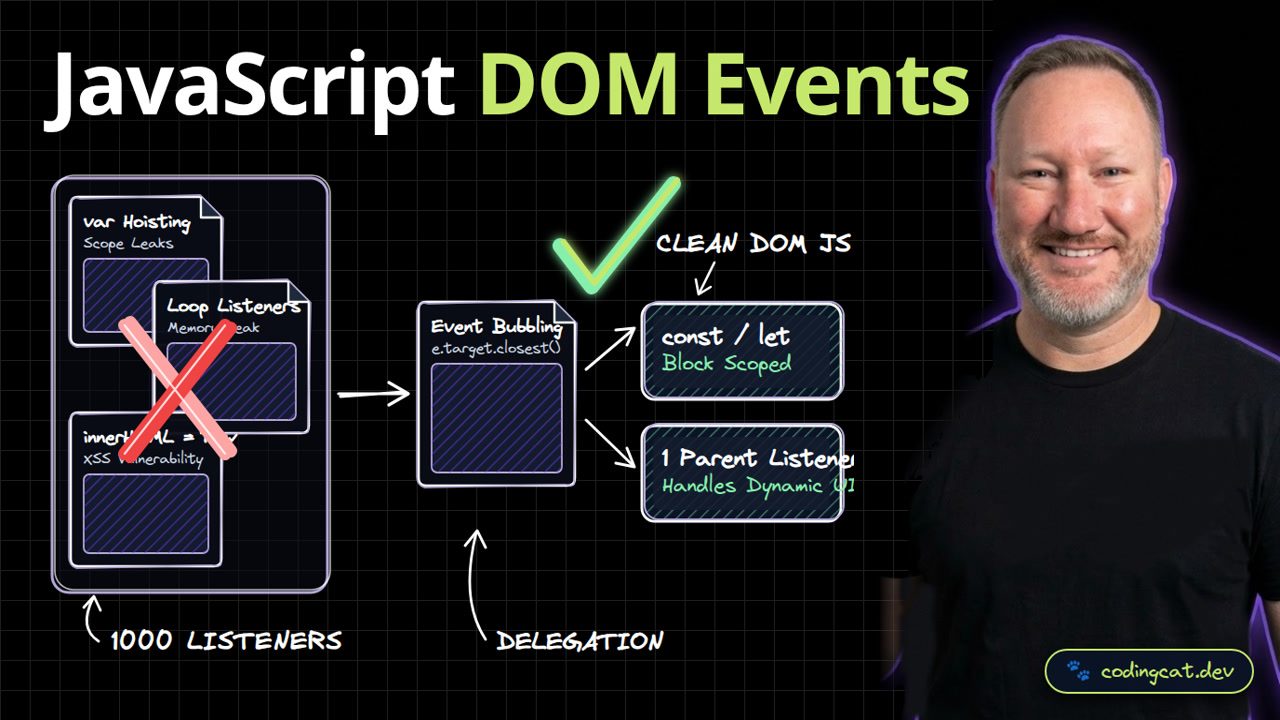
On the left, attaching individual listeners in a loop leaks memory and misses new DOM nodes. On the right, event bubbling lets a single parent listener handle clicks via target.closest.
3. Show Me the Code (src/dom-delegation.ts)
const list = document.querySelector<HTMLElement>("#lesson-list");

list?.addEventListener("click", (event) => {
  const target = event.target as HTMLElement;
  const btn = target.closest<HTMLButtonElement>("[data-lesson-id]");
  if (!btn) return;
  btn.setAttribute("aria-pressed", "true");
});
In src/dom-delegation.ts, we attach one click listener to #lesson-list and use target.closest with a data-lesson-id selector to handle any button click safely.
4. Production Trade-Off Matrix
Comparing event delegation and textContent against loop listeners and raw innerHTML, delegation scales to thousands of items and prevents XSS vulnerabilities.
5. Verdict & AJ Pro-Tip
AJ Pro-Tip: Always use element.textContent instead of element.innerHTML when inserting user-provided text into the DOM so malicious script tags are never executed.
That completes Odin Project Course 1: Web Development Foundations! Subscribe to CodingCat.dev and jump into Course 2: Git and GitHub Workflows.
how this course connects together.
Follow AJ from first principles to production-ready architecture.